
 Creating the J2EE Security Roles to Use for
the EJB Methods
Creating the J2EE Security Roles to Use for
the EJB Methods 
Use
For this tutorial, you will create two security roles. The first role, CarRentalEmployee, will allow users to view current reservations. The second role, BookingAgent, will allow users to view, create and cancel reservations.
Prerequisites
|
|
The quick car rental application’s EJB project, J2EE_QuickCarRentalEJB, is displayed in the J2EE Explorer. |


Procedure
...
1. Expand the J2EE_QuickCarRentalEjb project.
2. Open the ejb-jar.xml file by selecting it with a double-click.
3. Choose the Assembly tab page.
The elements for security-role, method-permission, container-transaction, and Exclude-list appear.
4. Select the security-role element and choose Add.
5. In the Role name field, enter CarRentalEmployee.
6. Choose Add again.
7. In the Role name field, enter BookingAgent.
The two roles are created. See the figure below.
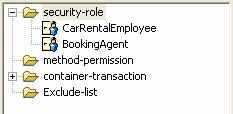
8. Save the data.
Result
The <security-role>elements for each role are added to the deployment descriptor for the EJB in the ejb-jar.xml file.
<security-role> |
In addition, the <security-permission> entry is added to the deployment descriptor in ejb-j2ee-engine.xml.
<security-permission> |
Next Step: