
 Modifying the UME
Roles and User Assignments
Modifying the UME
Roles and User Assignments 
Use
Once you have deployed the application and the new UME action to the AS Java, modify the UME roles so that the users Agent and Pr_Agent can access the Web Dynpro car rental application and perform the corresponding tasks. Employee should not be allowed to perform any tasks.
Therefore, to allow the users Agent and Pr_Agent access to the Web Dynpro application, you will add the action AccessWebDynproCarRental to the roles BookingAgentRole and PremiumAgentRole.
Prerequisites
|
|
The AS Java is running. |
|
|
You have a user ID with administrator rights, for example, Administrator. |


Procedure
...
1. Start the UME user administration management console and log on as an administrator user.

http://localhost:50000/useradmin
The Identity Management screen appears.
2. Select Role in the Get field and choose Go.
A list of available roles appears.
3. Select the BookingAgent role.
Details about this role appear in the lower section of the screen.
4. Choose Modify.
5. Choose the Assigned Actions tab page.
6. In the Assigned Actions sections, choose Goto obtain the list of actions already assigned to this role.
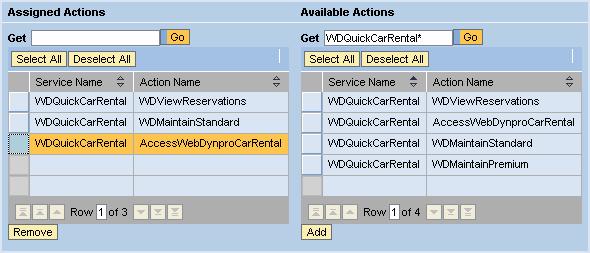
7. In the Available Actions section, enter WDQuickCarRental* in the Get field and choose Go to search for the actions that apply to the quick car rental application.
8. Select the action AccessWebDynproCarRental from the Available Actions and choose Add.
This action is added to the list of Assigned Actions for the role. See the figure below.
9. Save the role.
10. Repeat for the PremiumAgentRole role.
Result
The users that are assigned to these roles are allowed to access the Web Dynpro car rental application and perform tasks. Users who do not have this action in their role assignments will be able to access the Web Dynpro application, but the input fields will be set to read-only.
Next Step: