
 Adding a Reference to the Classloader of the
Security Provider
Adding a Reference to the Classloader of the
Security Provider 
Procedure
To allow the classloader to load the new login module, you have to manually register it in the Security Provider service. To do this, proceed as follows:
...
1. Start the Config Tool from the directory C:\usr\sap\<SID>\JCXX\j2ee\cluster\configtool.
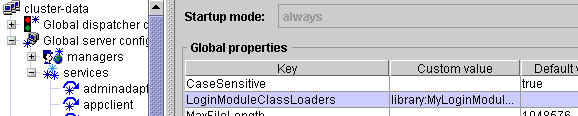
2. Go to cluster-data ® Global server configuration ® services ® security.
3. Select the LoginModuleClassLoaders property and enter library:MyLoginModuleLibrary as the value.
4. Choose Set.
Result
Properties Management Result Preview
Next Step