
 Defining Actions in the actions.xml
File
Defining Actions in the actions.xml
File 
Use
You have now included permission checks in your application to check if a user has the authorization to view reservations or to maintain a reservation for a specific vehicle type. To perform these activities, the user must have the appropriate permissions assigned in his or her user account.
To make the administration of these permission assignments easier, you will group individual permissions together in actions that the administrator will assign to the user’s roles. To specify these groups of permissions in corresponding actions, you will create a file with the name actions.xml that you will later deploy to the AS Java.
The actions.xml file that you create for this tutorial will contain the following actions:
· ViewReservations
Users that are assigned to roles containing this action will be able to view reservations.
· MaintainStandard
Users assigned to roles containing this action will be able to maintain standard vehicle types (economy, compact, intermediate, full size, and mini van).
● MaintainPremium
Users assigned to roles containing this action will be able to maintain the premium and luxury vehicle types.
The corresponding permissions are checked in the EJB methods using the QuickReservationEjbPermission class.
To create this file in the EJB project, you will use the Navigator in the SAP NetWeaver Developer Studio.
Prerequisites
|
|
The Navigator is displayed in the SAP NetWeaver Developer Studio. |
|
|
The quick car rental application’s projects are displayed in the Navigator. |


Procedure
...
1. Switch to the Navigator.
2. Choose File ® New ® Project from the menu.
The New Project dialog appears.
3. Select Development Componentand choose Next.
The New Development Component Project dialog appears.
4. Expand Local Development, select MyComponents and choose Next.
5. Enter a name for the project, for example, WDAction, in the Name: field. (The name is limited to 8 characters.)
6. Under Type:, expand the Content node, select UME Permissions and choose Finish. See the figure below.
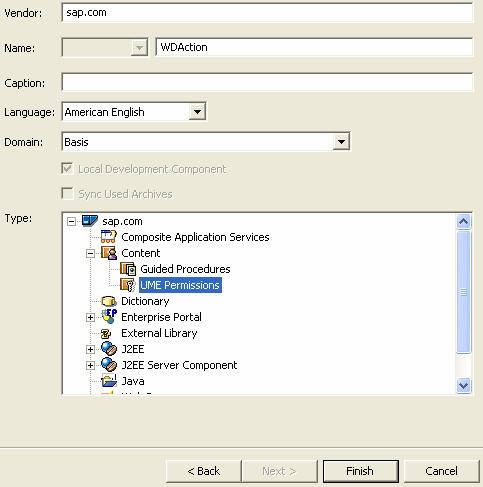
The SAP NetWeaver Developer Studio creates a project with the name LocalDevelopment~Actions~sap.com.
7. Expand this project.
8. Select the src node, open the context menu and choose New ® File.
9. Enter actions.xml in the File name: field and choose Finish.
The XML file is created.
10. Choose the Source tab page from the multi-page editor.
11. Enter the following XML tags that specify the actions for ViewReservations, MaintainStandard, and MaintainPremium in the file.

If you already worked with the J2EE-based tutorial, then make sure that the business service name and the action names differ from those used in the J2EE-based tutorial so that you can distinguish them later in the administration.
<BUSINESSSERVICE NAME="WDQuickCarRental"> |
12. Save the data.
Next Step:
Build and Deploy the Archive File