
 Web Dynpro Phase Model
Web Dynpro subdivides a single request/response cycle - also called server roundtrip - triggered by the client into different phases. This subdivision is called a phase model.
The entire phase model is stateless - that is, all objects used for the processing of a request/response cycle are destroyed and not reused after the cycle is completed. The Web Dynpro runtime creates a new set of objects for a new request of the application. After the instantiation of the objects, the different phases are processed only one time. Individual phases can be skipped in case of error.
Regardless of whether or not an error occurs in the request/response cycle, the wdDoPostProcessing() method is always called. This is the last point in processing at which your own application code can be processed.
The phase model defines the following phases (in the sort order shown below):
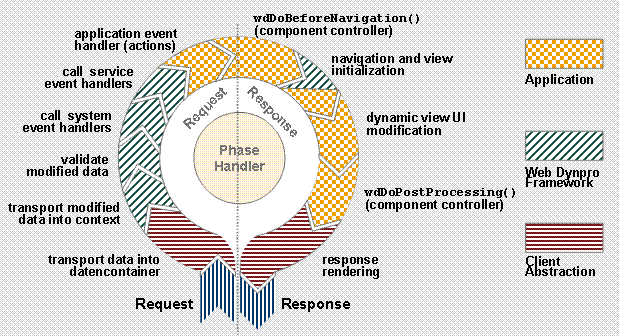
Data Transport into the Data Container
At the beginning of a request/response cycle, data of the client-specific data format is transported into the client-independent and protocol-independent Web Dynpro data container.
Transport of Modified Data into the Context
The storage of the data in the data container is string-based. Modified data is parsed before it is transported into the context - that is, it is converted into the type-specific format. Before the validation, modified data is stored in the corresponding controller context provided that the type-specific conversion is possible. Since the parsed data value does not have to be valid according to the data type, also invalid data values are stored in the context. If a type-specific data conversion is not possible, a validation error occurs.

Data that cannot be parsed is not stored in the context. However, as an application developer, you can use the IWDValidationCheck API to access the pure string values in the data container. This service can be accessed using wdComponentAPI.getValidationCheck().
Note that an error can also occur during the transport of type-specific values into the context. This can be the case when an exception is raised during the writing of a model attribute value. In this case, the data is treated as if a type-specific conversion is not possible.
Validating Modified Data
If a data value in the data container can be parsed, the validation of this value is the next step. The value is also checked for its semantic correctness - validity of key values, correct formatting - defined by data type metadata. If the validation of a data value fails, an error is reported.
If an action is triggered, the subsequent phase action event handler is called.
System Event Handler
System requests are events that do not involve the application. They are processed in the system event handler phase. A typical system request is Logoff or Enable Trace. There are no subsequent phases. System events are therefore transparent to the application developer.
Service Event Handler
System events are events that involve the application but their processing in the framework is completely generic. Typical service requests are Load-On-Demand, Paging in the Table UI element, or requests for the value help (SVS, EVS, and OVS).
After the handling of service events, the Web Dynpro phase handler calls the methods wdDoBeforeNavigation() and wdDoPostProcessing() implemented in the component controller, provided that your own application code does not have to be processed before. The latter can be the case if, for example, supply functions or similar functions (used for on-demand value lists, for example) must be called for a specific service of the Web Dynpro runtime.
Action Event Handler
In this phase, the action event handlers of the Web Dynpro application are called. The context now contains data and parses all user entries that can be parsed.
An action event handler is called for validating actions only if the entered data is valid – that is, no errors occurred during the validation phase. Otherwise, the methods wdDoBeforeNavigation() and wdDoPostProcessing()are directly and subsequently called. All phases in between are skipped. Finally, all formatting and validation errors reported up to then are displayed on the user interface for input correction.
The corresponding action event handler is called for non-validating action even if invalid data was entered. The errors reported up to then are not displayed. You can check the validation state of individual context attributes in event handlers for non-validating actions using the method getValidationCheck() provided by the IWDComponent-API. This method returns an object of the type IWDValidationCheck.
You can call outbound plugs in action event handlers and use them to navigate to other views. All outbound plugs are collected in a navigation list which is read by the Web Dynpro View Manager in a later phase to specify the next view assembly.
If an error with the parameter cancelNavigation==true is reported to the Web Dynpro Message Manager in this phase, the methods wdDoBeforeNavigation() and wdDoPostProcessing() are directly called. For each error a message is displayed for the user to execute troubleshooting. The outbound plugs already called are removed from the navigation list.
Note that the raise… methods of the IWDMessageManager API (like raisePendingException(), raiseException()) can only be used by action event handlers and the methods that can be called by these handlers.
Navigation Preparation – wdDoBeforeNavigation()
When executing large Web Dynpro applications, it might not be sufficient to ensure the consistency of the user entries by checking the individual contexts or all controller contexts within a single Web Dynpro component. SAP recommends that before you trigger a navigation change, you should check whether controller contexts of several Web Dynpro components contain valid data.
The Hook method wdDoBeforeNavigation() in the component controller allows you to execute such extensive and cross-component checks and display error messages, if necessary. This method is called by the Web Dynpro runtime before each processing of the navigation targets that have been accumulated till then. Only when the check is terminated, the Web Dynpro runtime assembles all views visible on the user interface (the new view assembly), initializes the view controller instances that have not been created yet and processes there the inbound plug event handlers defined by the navigation targets.
Navigation
The Web Dynpro runtime processes the outbound plugs contained in the navigation list and calls the event handler of the corresponding inbound plugs. An outbound plug is connected to at least one inbound plug by means of a navigation link. If an inbound plug event handler triggers an outbound plug, this navigation step is also executed.
The application developer must ensure that inbound plugs are completely processed even if errors occur. Otherwise the navigation cannot terminate successfully. If errors occur and you try to interrupt or change the navigation, the application and the output of a stack trace are terminated by the Web Dynpro runtime. Therefore, errors must be caught in the event handler. To do this, the complete IWDMessageManagerAPI can be accessed except for the raise… methods.
Dynamic UI Manipulation
In this phase, the wdDoModifyView() method is called for all views contained in the current view assembly. The view controller context can be considered stable at this point in processing. This means that the filling of the context with data for the display on the user interface is completed.
The following processes are not allowed in this phase:
· Calling outbound plugs
· Calling raise… methods of the Web Dynpro Message Manager (IWDMessageManager API)

SAP strongly recommends not to write data in the context of the wdDoModifyView() method. Also, the dynamic UI manipulation must not have any side effects.
Postprocessing of Errors – wdDoPostProcessing()
The wdDoPostProcessing() method implemented in the component controller is automatically called by the Web Dynpro runtime before the rendering of the view layout, but after the handling of all events and navigation targets. Therefore, navigation is not allowed in this method. At this point in processing, the process of the filling of controller contexts by the Web Dynpro runtime is completed - for example, by the call of supply functions, getter methods of calculated context attributes). The contexts are already contained in the data displayed in the views.
The application developer can use the Hook method wdDoPostProcessing() to handle errors occurred during the (previous) data filling of the controller contexts. However, it is not possible to call raise… methods of the IWDMessageManager API. This ensures that the data required for the following rendering is locally available and the data retrieval does not cause errors. The doPostProcessing()method is called by the Web Dynpro runtime for all active component controllers starting with the root component.
SAP recommends not to write data in the context of the wdDoPostProcessing() method.
Response Rendering
The final phase is the response rendering executed by the Web Dynpro runtime. The application developer cannot intervene in the process of this phase. The data container is converted into the client-specific data format and returned to the user interface.