
 Developing the
EMailEditor View
Developing the
EMailEditor View 
View Controller Context
Controller Context of the EMailEditor View |
|||
Context Element |
Type |
Property |
Value |
|
Value attribute |
type |
string |
|
Value attribute |
type |
string |
|
Value attribute |
type |
string |

Layout of the View
The following table
contains the hierarchy of the UI elements contained in the EMailEditor
view. Properties linked to the value attributes are marked by the symbol  in front of the path specification of the
value attribute.
in front of the path specification of the
value attribute.
Layout of the Form View |
|
|
|
Property |
Value |
Container RootUIElementContainer of the type TransparentContainer |
|
Properties of Transparent Container - layout |
GridLayout |
Layout - colCount |
1 |
Text HeaderText of the type TextView in the UI-element RootUIElementContainer |
|
Properties of TextView – design |
header1 |
Properties of TextView – text |
Greeting |
LayouData – paddingBottom |
large |
Label EMailTextLabel of the type Label in the UI element RootUIElementContainer |
|
Properties of Label – text |
E-Mail Text: |
Properties of Label – labelFor |
EMailEditorText |
Input field EMailEditorText of the type TextEdit in the UI-element RootUIElementContainer |
|
Properties of TextEdit – cols |
60 |
Properties of TextEdit – rows |
12 |
Properties of TextEdit – value |
|
Pushbutton SendEMailButton of the type Button in the UI element RootUIElementContainer |
|
Link LinkToForm of the type LinkToAction in the UI element RootUIElementContainer |
|
Properties of LinkToAction – paddingTop |
medium |
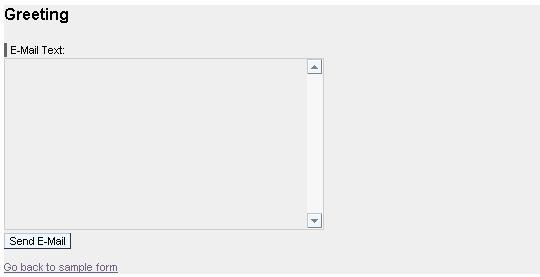
Actions and Binding Events
In the view controller, define the two actions GoBack and SendEMail:
Controller Context of the EMailEditor View |
|||
Name of the Action |
Text |
Without Validation |
Event Handler |
GoBack |
Go back to sample form |
|
onActionGoBack |
SendEMail |
Send E-Mail |
|
onActionSendEMail |

Afterwards, link the onAction events of two UI elements to the two actions defined previously.
Linking Events to Actions in the EMailEditor View |
||
UI Element Name |
Event Name |
Action |
SendEMailButton |
onAction |
SendEMail |
LinkToForm |
onAction |
GoBack |
 The next step is to define the navigation
structure between the two views Form and EMailEditor.
The next step is to define the navigation
structure between the two views Form and EMailEditor.