
 Creating an Action at Design Time
Use
To assign an action to a UI element, you must create the action in the SAP NetWeaver Developer Studio, bind it to the UI element, and manually implement the event handler in the controller of the corresponding view.
Procedure
...
1. You can create an instance of a UI element at design time using the View Designer. In the SAP NetWeaver Developer Studio, you drag a button UI element from the UI element toolbox to the editor area of the View Designer.
2. You can then create the action and select the action tab page (indicated by the white frame in the toolbar of the following graphic). In the edit area, you can:
¡ Assign a name to the action
¡ Specify the validation
¡ Define possible parameters
The Web Dynpro generator automatically creates the event handler. If you assigned the name Save to the action, the corresponding event handler is onActionSave (see graphic below).
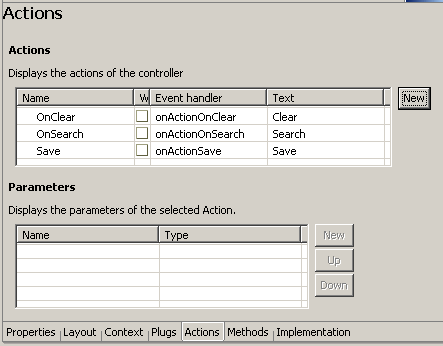
3. You also declare the binding of a UI element to an action at design time. When declaring an action in the SAP NetWeaver Developer Studio, a function area – known as the user coding area – is generated in the controller of the corresponding view. You can program the event handler in this function frame. The following code example shows the user coding area that was generated for the Save action. The actions OnClear and OnSearch are already implemented:
/** declared event handler */ public void onActionOnClear() { //@@begin onActionOnClear(ServerEvent) wdContext.currentNodeSearchElement().setEmployee_Id(""); wdContext.currentNodeSearchElement().setFstname_M(""); wdContext.currentNodeSearchElement().setLastname_M(""); wdContext.currentNodeSearchElement().setOrgtxt_Lg(""); wdContext.currentNodeSearchElement().setRoom_No(""); //@@end }
/** declared event handler */ public void onActionOnSearch() { //@@begin onActionOnSearch(ServerEvent) wdThis.NavToResults(); //@@end }
/** declared event handler */ public void onActionSave() { //@@begin onActionSave(ServerEvent) //@@end }
//@@end } |

The program code of the event handler should only be inserted into the user
coding area – that is, between the comment lines //@@begin and //@@end. Otherwise, the Web
Dynpro generator overwrites or deletes the code during the
creation.
4.
The UI
element (in this case: the button) is bound to the action. The properties of
the UI element are processed in the property editor, and the previously
created action is selected for the onAction property of the button. The action
event handler is called at runtime when the user selects the button.
Having defined an action, you can use it for other UI element events and other
UI elements.
Result
You have defined an action at design time and bound it to a UI element.