Editing the Properties for the UI
Element
Editing the Properties for the UI
Element 
Use
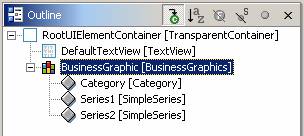
In this step you create the following subelements for the UI element, Business Graphics:
· A category
· Two data series
Procedure
First create the category as follows:
1. Go to the Outline window.
2. Click BusinessGraphic with the secondary mouse button.
3. In the context menu choose Insert Category.
A category appears in the Outline window as a subnode to the BusinessGraphic node.
Create the first series as follows:
1. Click BusinessGraphicwith the secondary mouse button.
2. In the context menu choose Insert Series.
A dialog box appears.
3. Enter Series1 in the field Name.
4. Select SimpleSeriesfrom the list box Type.
5. Choose Finish.
A series appears in the Outline window as a subnode to the BusinessGraphic node.
Create the second series in the same way you created the first series. Call it Series2.
...
A second series appears in the Outline window as a subnode to the BusinessGraphic node.
Result
You have now created a category and two data series for your graphic.
You should see the following structure in the Outline window: