
 Billing in ERP

Purpose
You can use this business process to know the process flow in which you bill a customer for resources used such as personnel costs or materials. You use billing to create invoices for your customers.
Before a billing request is created you see a modifiable overview screen that enables you to determine what the billing request must look like, and what amounts should be calculated, postponed, or canceled. During billing, the system generates dynamic items from the information about expenses involved. You must simulate the prices and save the dynamic items. You can then generate the billing request.
Process Flow
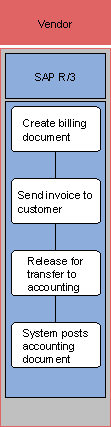
1. Create billing document
The billing document is created with reference to a preceding document. For example, to create an invoice or a credit memo you create a billing request using single or collective processing. The billing document includes data such as the:
¡ Billing date
¡ Net value of the entire billing document
¡ Partner numbers such as the identification number of the sold-to party
¡ Pricing elements
¡ Net value of individual items
¡ Number of the reference document
2. Send invoice to customer
Activities that are carried out on the basis of orders are invoiced to the customer. If no complaints are made, the business transaction is considered complete.
3. Release for transfer to accounting
4. System posts accounting document
Once the system has generated billing documents, the billing amounts are posted to accounts receivable. Similarly, the revenue information is updated with controlling data after billing.
The system posts costs to the controlling object (CO). In controlling, revenues are updated in the relevant controlling object, which is either an internal order or a profitability segment.