
 Sales Order Processing B2C in CRM Web
Channel
Sales Order Processing B2C in CRM Web
Channel

Purpose
You can use this business process to enable customers to order products and services quickly and easily via the Web shop in a business-to-consumer (B2C) scenario. This business process fully integrates your Web shop with SAP CRM, enabling you to promptly and efficiently handle the complete order process, from creating a sales order, to delivering the goods to your customers.
Process Flow
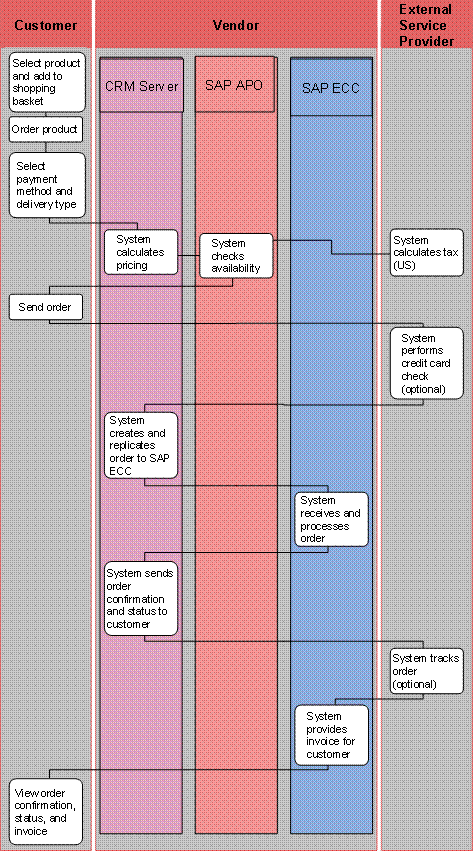
1. Select product and add to shopping basket (Web shop)
The customer
can browse the product catalog hierarchy or use the quick or extended search
function to find products. In addition, the customer can select from former
 transactions,
for example, orders, quotations, invoices, or order templates. If the customer
has maintained a profile,
cross- and up-selling
products are displayed.
transactions,
for example, orders, quotations, invoices, or order templates. If the customer
has maintained a profile,
cross- and up-selling
products are displayed.
Customers can configure products using the SAP Internet
Pricing and Configurator (IPC). During the
interactive
configuration process, SAP IPC displays the product options that can be
combined, and automatically checks the selected product options are consistent
and complete. Customers can also use the SAP IPC to configure prices,
including complex pricing, and get support during a search for products that
either partly or fully match their selected search options. The Sales Pricing
Engine determines the price automatically
2. Order product (Web shop)
To order products the customer must log on to the Web shop. The system automatically creates a business partner master record based on the data of the reference customer that was specified in the Web shop profile. The master record is saved in the SAP ECC system.
3. Select payment method and delivery type (Web shop)
4. System calculates pricing (SAP CRM)
SAP ECC determines product availability and reserves the items each time orders are created or updated. The availability of the customer’s products is displayed to them at item level.
5. System performs availability check (SAP APO)
The system
runs a
check
on the availability of the product.
6. System calculates tax (US)
Optionally, for example, for vendors in the United States of America, you can use an external service provider to calculate tax.
7. Send order (Web shop)
The customer checks (delivery type, delivery address, etc.) and saves the order. The order is transferred to the SAP ECC system.
8. System performs credit card check (optional)
9. System creates and replicates order to SAP ECC (SAP CRM)
10. System receives and processes order (SAP ECC)
11. System sends order confirmation and status to customer (SAP CRM)
12. System tracks order (optional)
Optionally, you can use an external service provider to track the order. For example, the carrier can display the delivery status.
13. System provides invoice for customer (SAP ECC)
14. View order confirmation, status, and invoice (Web shop)
Customers can view order confirmation and status, and display invoices in the Web shop. Customers can change the orders depending on the order status.