
 Browsing for and Selecting Products in
CRM
Browsing for and Selecting Products in
CRM

Purpose
You can use this business process to enable your business partners (business-to-business) and customers (business-to-consumer) to search for products and make selections in your Web shop. You can provide your customers with personalized recommendations and configurable products.
Process Flow
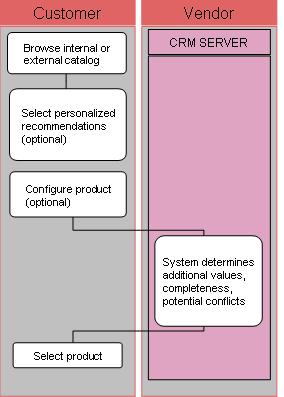
Browse inzer...
1. Browse internal or external catalog (Web shop)
You can provide links to internal and external catalogs in your Web shop. Web shop customers can browse for products using the product catalog hierarchy or by using the quick or extended search functions.
2. Select personalized recommendations or product advisor (optional) (Web shop)
You can define personalized and global product recommendations for Web shop customers. Global product recommendations are displayed to all Web shop customers, whereas personalized product recommendations are based on the customer’s profile. You can also display cross- or up-selling products and accessories items in the product catalog. In addition, you can set up your system to react dynamically to the Web shop users’ choices.
3. Configure product (optional) (Web shop)
The customer can configure products in the Web shop catalog and transfer them, as configured, to the purchase order.
4. System determines additional values, completeness, potential conflicts (SAP CRM)
During the process of interactive configuration, the SAP Internet Pricing and Configurator (SAP IPC) informs customers which product options can be combined and automatically checks the selected product options are consistent and complete.
Customers can also use the SAP IPC to configure prices, including complex pricing, and search for products that either partly or fully match the options they select for a particular product. The Sales Pricing Engine determines the price automatically.
5. Select product (Web shop)
The customer can select products from the Web shop catalog or from former transactions, for example orders, quotations, invoices, or order templates.