
 OpportunityAnalysis in CRM
Purpose
You can use this business process to evaluate both opportunities as well as the processes involved in the opportunity stage of a sales cycle. It provides data about predicted sales revenue from opportunities, expected product revenues, and opportunity pipeline information. You can also use the results of opportunity analyses for your future sales strategy, for example, by looking at competitor information to create target groups for future marketing campaigns.
Process Flow
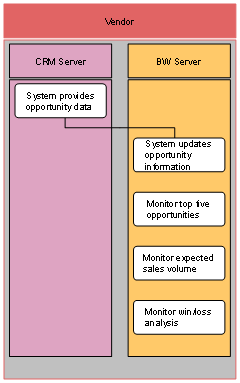
1. System provides opportunity data
The SAP Customer Relationship Management (CRM) system provides opportunity data.
2. System updates opportunity information
The SAP Business Information Warehouse (BW) system updates its opportunity information.
3. Monitor top five opportunities
You can monitor the top five most valuable opportunities. To do this, you use the Top Five Opportunities query (technical name: 0CRM_C04_Q013).
4. Monitor expected sales volume
You can monitor the expected sales volume from current opportunities. To do this, you use the Sales Volume Forecast query (technical name: 0CRM_C04_Q002).
5. Monitor win/loss analysis
You can evaluate opportunities according to their status (won or lost). To do this, you use the Win/Loss Analysis query (technical name: 0CRM_C04_Q001).