
 Business Partner Role (BP
Role)
Business Partner Role (BP
Role) 
Definition
Rights and obligations that can be taken on by a business partner in different business transactions.
Use
You can use the business partner role to carry out a business classification of a business partner.
The basis for the definition of a business partner role is a business transaction. The attributes of the BP role depend on the particular transaction involved. The data that is available for a transaction also depends on the business partner category.

Transactions and Associated Roles
Activity |
BP Role |
Order |
Sold-to party |
Delivery of goods |
Ship-to party |
In addition to the central BP roles, there are application-specific roles, such as
· Contract partner and installer for utility companies
· Sold-to party and ship-to party for CRM Enterprise
You can create a business partner in one or more BP roles. Central data such as name, address and bank details only has to be created once.
The BP role General Business Partner is automatically assigned to a business partner. Depending on the function of the business partner in question, you can also select the following BP roles:
You can group roles
together in a role grouping, which you can then select in the dialog. For more
information see  BP role
grouping.
BP role
grouping.
You can use the following functions for displaying and maintaining BP roles in the dialog:
· Overview of all roles assigned to a business partner
· Deletion of a role assignment
· Where-used list for a role (for example, in an application)
The where-used list allows you to check whether it is possible to delete the assignment of BP roles to business partners that form part of a business partner relationship. If the relevant role categories are defined at the level of the relationship category and form a prerequisite for creating a relationship, then the assignment cannot be deleted.
The following diagram provides you with an overview of the different elements of the role concept and how they fit together.
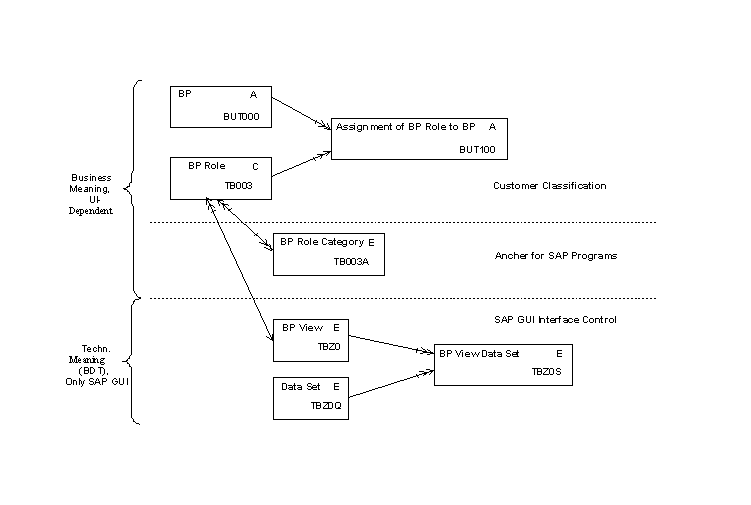
Structure
For more information on the BP roles concept, see the Implementation Guide (IMG) of the Business Partner.
Integration
An extension of the
BP roles to include customer-specific attributes is possible. For more
information, also see the Business Data
Toolset.
Make the necessary settings for the BP role in the Implementation Guide (IMG) in Customizing of the Business Partner under Basic Settings ® Business Partner Roles.
Example
You are an employee in the sales department of the company Smith p.l.c. You have made contact with Ms. Lopez at Hansen p.l.c. You would like to send her information about your existing products. You create the following business partner master data:
· A master data record for a business partner with the name “Hansen p.l.c.” with the BP role Prospect, for which you define the required validity data. You create the central data and the address.
· A master record for a business partner with the name “Ms. Lopez“ with the BP role Contact Person, as well the role’s validity. You create the central data, the address and the relationship “is contact person of” at Hansen p.l.c.
Three months later, Hansen p.l.c. places an order. The invoice should be sent to the parent company, Hansen and Sons, to be settled. You create the following new business partner master data:
· You create the role Prospect and assign Hansen p.l.c. the role Sold-To Party. This role is valid from the day of the order. You create sales and shipping data for a specific sales area.
· A master record for a business partner with the name “Hansen and Sons” with the BP roles Bill-To-Party and Payer. You create the central data, the address, the bank details and the billing data.