
 Configuring More Than One RFC Connection to an
SAP System
Configuring More Than One RFC Connection to an
SAP System 
Use
You can configure more than one RFC connection between a TREX system and an SAP system.

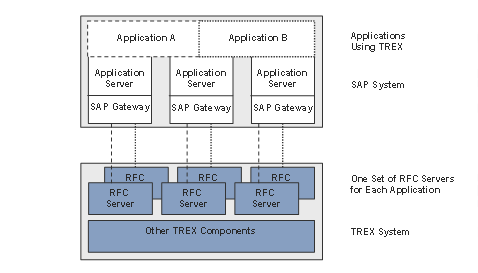
More than one application in an SAP system should access the same TREX system. For organizational and performance reasons, each application should use a separate RFC connection. This means:
· There is a separate RFC destination for each application in the SAP system.
· There is a separate TREX RFC server for each application in the TREX system.
The graphic below depicts this constellation.
Procedure
1. Configure the first RFC connection to the SAP system.
For more information, see Initial Configuration.
2. For each remaining RFC connection, work through the following steps:
a. Create an RFC destination in the SAP system. To do this, use the RFC Destination (SM59) function in the Landscape RFCwindow.
b. Choose Connect to test the connection.
c. Choose Repair All to update the TREX configuration.