
 Example of Service Recall Processing
In the following
example, all steps that play a significant part in service recall processing
are described with example data. You have to have carried out the Customizing
described under  Service Recall
Processing: Exchange of Defective Products for all of the sales
transactions that are mentioned.
Service Recall
Processing: Exchange of Defective Products for all of the sales
transactions that are mentioned.
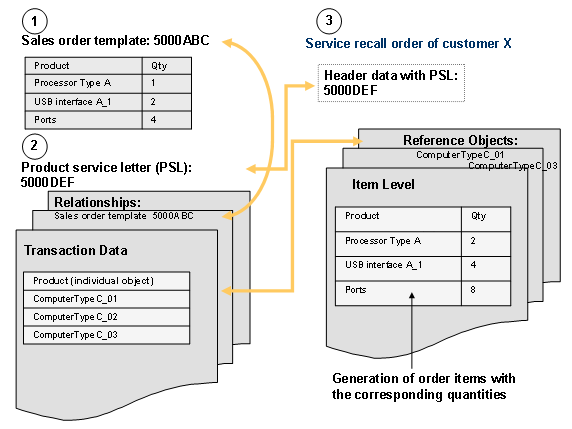
Step 1: Create Sales Order Template
In step 1, you create a sales order template that contains transaction ID 5000ABC when saved. To create the sales order template, use the transaction type SALT, which is provided for this purpose. In this sales order template, enter all products (service parts) with their various quantities that you want to be exchanged for an individual object. The products and quantities used in the example are:
Product |
Quantity |
Processor Type A |
1 |
USB Interface A_1 |
2 |
Ports |
4 |
Release sales order template 5000ABC.
Step 2: Create Product Service Letter (PSL)
In step 2, you create a product service letter (PSL) that contains transaction ID 5000DEF when saved. To create the PSL, use the transaction type PSLF, which is provided for this purpose.
Enter all product IDs of the individual objects for which the service parts concerned should be exchanged in the PSL. The individual objects used in the example are computers of type C whose product IDs are as follows:
Product ID |
ComputerTypeC_01 |
ComputerTypeC_02 |
ComputerTypeC_03 |
In addition, you have to link to the sales order template in the PSL. To do this, enter the transaction ID of the sales order template (5000ABC) on tab page Relationships in view Transaction Data.
Then release PSL 5000DEF.
Step 3: Create Service Recall Order
In step 3 you
create the service recall order. Enter the corresponding product service letter
(transaction ID 5000DEF) at header level in the input field Product Service
Letter. If you have made all of the Customizing
settings as described in Service Recall
Processing: Exchange of Defective Products in section 'Prerequisites', the
tab page Reference Objects is also available to you. On this tab page, enter the product IDs of the
individual objects for which you want to deliver the service parts to the
customer. In this example, these
are the product IDs ComputerTypeC_01 and ComputerTypeC_03. When you confirm
your entries, the system creates the order items of the service parts with the
required quantities for all individual objects entered. When you save the service recall order, the product
service letter is updated, that is, the status of the individual objects
ComputerTypeC_01 and ComputerTypeC_03 is set to Complete.
During service recall processing, the system ensures that your customer does not receive more products (service parts) than the quantities that have been defined in the sales order template multiplied by the number of individual objects entered. In this example, therefore, the quantities are doubled, since only two individual objects are to be exchanged for customer X.