Including InfoCubes in Process
Chains
Including InfoCubes in Process
Chains 
Use
If you want to automatically load data into an InfoCube, you can include this as an application process in the procedure for a process chain.
Prerequisites
You already created an InfoPackage for loading data into your DataSource and a data transfer process for loading data into your InfoCube.
Procedure
...
1.
Call process chain maintenance. Select
 Process Chain Maintenance in the
Administration area of the Data Warehousing Workbench. The Process Chain Maintenance Planning View screen
appears.
Process Chain Maintenance in the
Administration area of the Data Warehousing Workbench. The Process Chain Maintenance Planning View screen
appears.
2.
In the left-hand screen area of the
required  display component, navigate to the process
chain in which you want to include your InfoCube. Double-click to select it. The system displays the
process chain plan view in the right-hand side of the screen.
display component, navigate to the process
chain in which you want to include your InfoCube. Double-click to select it. The system displays the
process chain plan view in the right-hand side of the screen.
If no suitable process chain is available, you need to create a new process chain. For more information see Creating Process Chains.
3.
To insert a process
for loading a data into an InfoCube, choose  Process Types in the left-hand area of
the screen. The system displays the available process categories.
Process Types in the left-hand area of
the screen. The system displays the available process categories.
4.
In the process
category  Loading Process and Postprocessing,
choose the application process type Execute InfoPackage.
Loading Process and Postprocessing,
choose the application process type Execute InfoPackage.
5. Insert this application process type into the process chain by using Drag&Drop. The dialog box for inserting a process variant appears.
6. Use the input help to select the InfoPackage that you want to include in the process chain.
7. Use the input help to select the data transfer process that you want to include in the process chain.
8. Connect the processes.
9. Save and check your process chain as described in Creating Process Chains.
Optional steps:
Optionally, you can also include the following processes:
·
 Deleting Indexes
·
 Building
Indexes
Building
Indexes
·
 Constructing Database Statistics
·
Deleting Overlapping Requests from an
InfoCube
·
 Rolling up Filled Aggregates
·
 Compressing InfoCubes
in the process chain.
Example
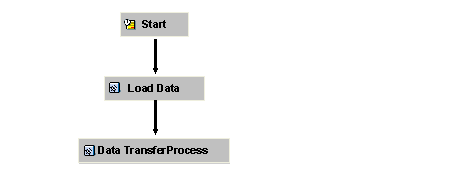
The following graphic illustrates an example of how a simple process chain is used to load data into an InfoCube.