
 Database Users and Database
Schemas
Database Users and Database
Schemas 
When a database user is created in a database management system (DBMS), a database schema of the same name is also generated. This type of database schema is a collection of database objects where tables and views are managed. The schema and the objects belong to the user. Other users can be assigned read-write authorizations for the schema and for the tables and views.
If you
want to use DB Connect to create a connection to a database source system, you
need to create a user name and password in the DBMS. In the following example,
this user is referred to as the BW user. You use the BW user to work in the
database schema that has been created with the name of the BW user.
The tables and views containing the application data are stored in the DBMS,
usually in an applications schema. Make sure that the BW user has read access
to the tables and views in the application schema that are going to be
transferred into the BW system. The BW user must also be authorized to create
views in his or her schema. In the BW user’s schema, you use views to
access the tables and views in the application schema.
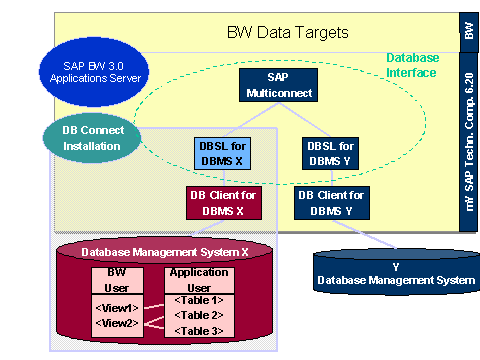
The advantage of this process is that it enables you to deal with administration and authorization issues centrally on the source system level.
· You need only one BW user and its corresponding schema to be able to extract data from a DBMS, which means that you also need only one source system connection to this DBMS. You use views in the schema of the BW user to access data that you want to extract and that is stored in other schemas.
· You can structure the views in such a way that you are able to control access rights to the tables and restrict or reformat data as well as carry out join operations across several tables. Using views also makes it easier to localize errors.

SAP recommends that if you need to make any conversions you make as many as you can in the view. This will allow you to identify at the source system level any errors or problems that may arise so that you can deal with them as quickly as possible.

You use conversion statements to
· convert the names of database tables into capital letters
· convert dates from the internal date format used in the database to the SAP date format YYYYMMDD
· By using views as an interface between a physical table and the BW system, you are able to use corresponding conversion statements in the view to make changes to the tables in the application schema, without this having an effect on the view itself.
· You are able to access tables with the same technical name by creating views with different names for these tables in the BW user’s schema. If the tables contain similar semantic content, you are able to control the authorizations for the database user in such a way, that he or she is able to access only the relevant tables.