
 Sending Grid Usage Invoices
Use
With this business process, you, in the role of the distributor, can send consumption billings, budget billing requests, and other posting for end customers to a market partner (invoicing service provider). At the same time, you can post aggregated bills to the invoicing service provider’s account, manage them, and print them out with an itemized statement.
Prerequisites
The billing-relevant consumption values must exist in the system. The bills for deregulated contracts at individual customer level must have been created according to the scheduling settings. If necessary, budget billing requests must have been made for grid usage.
Process Flow
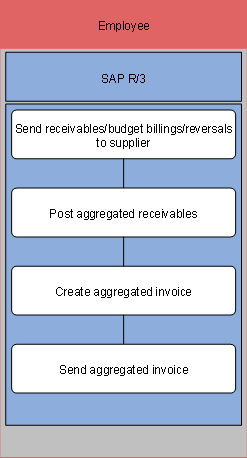
The following process runs in SAP R/3:
...
1. Send (individual) receivables/budget billings/reversal to supplier
In this step, you generate bills for the invoicing service provider, in order to exchange bill information between distributor and supplier, for example. The bill can be sent electronically or print documents can be prepared and sent.
You can execute this process as a mass activity.
The data exchange is logged and can be monitored.
2. Post aggregated receivables
In this step, you, in the role of the distributor, post the (individual) bills as an aggregated bill to the invoicing service provider’s account. You can group the individual bills together according to certain grouping characteristics.
The aggregated posting to the invoicing service provider’s account serves the tracking of receivables.
3. Create aggregated invoice
In this step, you create a print document for the aggregated bill that is used as the basis for bill issue in paper form. You have the following options:
¡ Print the data of the aggregated receivable
¡ Print the data of the aggregated receivable with information on the individual receivables
¡ Print an overview display in aggregated form
You can define the corresponding aggregated print document in the service provider’s contract account.
4. Send aggregated invoice
In this step, you print out the aggregated bills. You can use the reprint function to print out bills that have already been printed.
Result
You have created the grid usage bills for individual customers and sent the aggregated bills as a statement to the invoicing service provider (for example, the supplier).
In the next step, the invoicing service provider can process payment if all checks for incoming grid usage bills were successful, or trigger the complaint process.