
 Creating a Web Request
Purpose
A constituent can use this business process to register a service using the Internet with their local authority. There is a Web request for each service.
A Web request is an interactive form that, depending on its purpose, must be filled out using an HTML interface in the browser. The form for services with authentication (user ID and password) may already contain information on the person placing the request. The data entered by the person placing the request can be checked for accuracy.
The form can be given a digital signature before it is sent if you wish. This is the basis for the electronic and completely paperless processing of requests.
The request data transferred is created in SAP CRM for further processing as a service order.
Prerequisites
· Constituents can authenticate themselves in the system.
· For the digital signature for Web requests, constituents must have access to the necessary hardware ( Smart Card or reading device) as well as a certificate saved on the smart card.
· You have created the specific Web requests in Customizing and provided the corresponding BSP applications as links. For more information on the Customizing activities that have to be executed, see the Configuration Support for this Business process and/or Customizing in CRM, under Customer Relationship Management ® E-Service ® Web Requests.
Process Flow
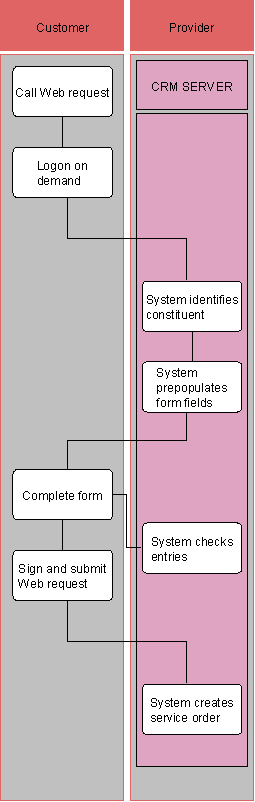
...
1. Call Web Request (Web Client)
The constituent selects the service to be requested and calls the respective Web request using the link.
2. Logon on Demand (Web Client)
For services that require registration, the constituent is requested to authenticate him/herself with their user in the system.
3. System Identifies Constituent (CRM Server)
The system checks the logon data and identifies the corresponding business partner data of the constituent.
4. System Prepopulates Form Fields (CRM Server)
5. Complete Form (Web Client)
The form of the Web request is displayed in the browser window. The constituent enters the required request data.
6. Sign and Submit Web Request (Web Client)
If supported or required, the constituent must sign a Web request digitally. They send the completed Web request to SAP CRM using the Send button.
7. System Checks Entries (CRM Server)
If the form is incomplete or filled in incorrectly, error messages ask the constituent to correct the data or add more data.
8. System Generates Service Order (CRM Server)
If the request data is complete and correct, a corresponding service order is generated in SAP CRM containing all request data for further processing.