
 Account Planning in CRM
Purpose
You can use this process to plan non-promoted sales for a planning customer.
The Account Planner application provides you with a sophisticated picture of all planned revenue, associated costs and contribution margin. This enables you to make more informed decisions during planning, and to better control costs from trade spends and discounts. Planning is embedded in general account management functions, and is easy to use and accessible.
The integration of Account Planner with BI and SAP ERP Central Component (SAP ECC) systems reduces the administrative effort of maintaining data, and can increase the accuracy of this data.
Together, account
planning in CRM and  Account Planning with
CRM Mobile Sales can contribute to increased transparency in planning
processes, leading to benefits in sales planning and production
planning.
Account Planning with
CRM Mobile Sales can contribute to increased transparency in planning
processes, leading to benefits in sales planning and production
planning.
Process Flow
...
The process for account planning in CRM is as follows:
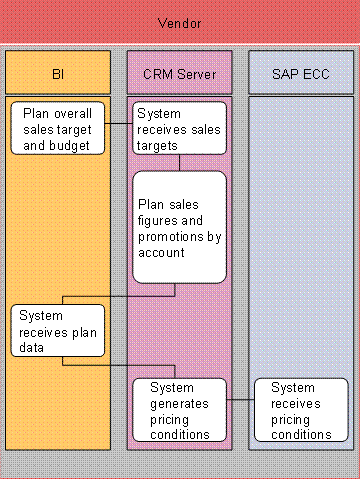
1. Plan overall sales target and budget (BI system)
It is possible for company headquarters to set sales targets at product-brand level, and then to distribute these targets top-down.

This must be set up separately in the BI system.
2. System receives sales targets (CRM Server)
3. Plan sales figures and promotions by account (CRM Server)
Planning is driven from past sales as well as from target information. Account planning enables you to do total sales forecasting, and includes discount and rebate planning. In addition, trade promotions that are related to the account plan are displayed.
4. System receives plan data (BI system)
Account Planner sends planning data to the BI system. The data is therefore available for reporting, and for integration with other planning applications.
5. System generates pricing conditions (CRM Server)
The system generates pricing conditions from the discounts or rebates that you enter in the account plan.
6. System receives pricing conditions (SAP ECC)
Account Planner sends pricing conditions to SAP ERP Central Component (SAP ECC). When a customer orders a product, the system includes the discounts agreed in the account plan in the sales order.