
 Defining an Authorization Token
Use
You use this procedure to create an authorization token for a protected business object and to assign authorization rules to the token. You can define a token for:
· The entire class of a business object (without authorization rules) to provide controlled access to its business data
· An instance of a business object (with authorization rules) to provide controlled access to a specific business data based on conditions

You can define more than one token for a protected business object, as illustrated in the figure below.
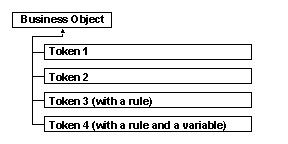
The access rights defined for each token is as given below:
Token Name |
Access Rights |
Token 1 |
Read |
Token 2 |
Read and Modify |
Token 3 |
Read, Create, Modify (with rule1) |
Token 4 |
Modify and Delete (with rule2) |
If you assign more than one token to a role, the role obtains maximum rights derived from the combination of access rights defined for the tokens. If you assign Token 1 and Token 2 to a role, the role allows Read and Modify access rights to the corresponding business data. If you assign Token 1, Token 3 and Token 4 to a role, the role allows:
§ Read access
§ Create and Modify access if the associated rule1 is true
§ Delete access if the associated rule2 is true
Prerequisites
You have:
...
1. Protected the business object for which you want to define a token
2. Defined the required authorization rule(s)
3. Decided whether to provide a static value or dynamic values for the rules you have defined. If you have decided to provide dynamic values, you must define a variable for the required rule. For more information, see Defining an Authorization Variable.
Procedure
Creating a Token
...
1. In the navigation bar, choose Business Object Authorization ® Define Tokens.
The Protected Business Objects tile appears.
2. On the Protected Business Objects tile, select the specific business object for which you want to create a token.
3. On the Available Tokens tile, right-click and choose New.
A row for the new token appears.
4. Enter a name and description for the token.
5. Choose Data ® Save.
Assigning an Authorization Rule to the Token
...
1. In the navigation bar, choose Business Object Authorization ® Define Tokens.
The Protected Business Objects tile appears.
2. On the Protected Business Objects tile, select the specific business object.
3. On the Available Tokens tile, select the specific token for which you want to assign a rule.
4. On the Assigned Authorization Rules tile, right-click and choose New.
The Assigned Rules dialog box appears, displaying the authorization rules you defined earlier.
5. Select the specific rule(s) you want to assign.

You can assign more than one rule to a token. In this case, the access rights defined for the token are applicable for the combination of business data as determined by the conditions of the rules. If the rules are contradictory, the rule which provides maximum accessibility to data is used during runtime.
Rule 1 defines a condition that a token must allow access to employee records starting from employee number 100 through 200. For the same token, Rule 2 defines the condition that employee records related to the city, “Frankfurt” cannot be accessed. However, the token allows access to the employee records, which are related to the city, “Frankfurt” if the respective employee numbers exist between 100 and 200.
6. Choose Select.
The Assigned Authorization Rules tile displays the rule(s) you have selected.
7. If you want to assign a variable for a rule, select a variable from the From Variable field.
The To Variable field is enabled only if the compare type of the rule is FROMTO. In this case, you must specify a range of variables.
You have defined a rule on EMPNO property of BOEMPLOYEE with compare type as FROMTO. For this rule, you have defined variables Var1 and Var2. While assigning this rule to a token, you have specified Var1as a From Variable and Var2 as a To Variable. Later if you provide values 100 for Var1 and 200 for Var2, only records starting from EMPNO 100 through 200 can be accessed during runtime.
Result
You have created a token and assigned authorization rule(s) to it.
You must now assign this token to a role. For more information, see Assigning an Authorization Token to an Authorization Role.
See also: