
 Data Backup and Restore for
TREX
Data Backup and Restore for
TREX
Use
You can back up Search and Classification (TREX), and restore the TREX installation using the backup version if problems occur.
It is advisable to back up TREX indexes and queues if the original index creation process took a long time and you want to avoid having to reindex if a large index is lost. In this way, you can also use archived TREX configuration files to restore an extensively configured TREX system landscape.
Features
You can back up and restore TREX in the following ways:
· Data Backup and Restore for Certain TREX Data
You can use scripts to back up and restore certain TREX data (TREX indexes and queues, TREX configuration files).
·
 Complete Data Backup
and Restore
Complete Data Backup
and Restore
You can make an offline backup of all TREX data (TREX installation, configuration files, indexes, and queues), and restore the TREX installation using the backup version if problems occur.
Overview of TREX System Landscapes
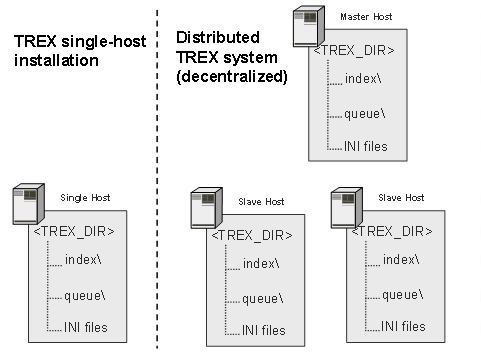
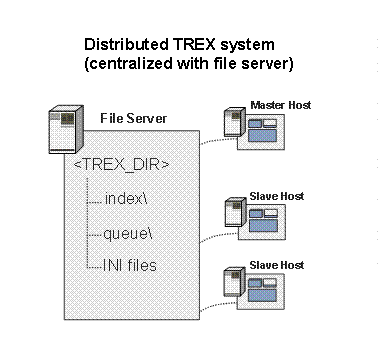
During data backup and restore, you must take into account the type of TREX system landscape you have installed and configured. The following TREX installation types are possible:
· TREX as a single-host installation
· TREX as a distributed system
¡ With decentralized data storage
¡ With centralized data storage (with a file server)

<TREX_DIR>: Installation directory for TREX. The path to the directory is:
§ On UNIX /usr/sap/<SID>/TRX<instance_number>
§ On Windows <disk_drive>:\usr\sap\<SID>\TRX<instance_number>
For more information about installing and configuring TREX, see the following guides on SAP Service Marketplace:
§ SAP NetWeaver 2004s Search and Classification (TREX) Installation Guide
service.sap.com/installation
§ SAP NetWeaver 2004s Distributed Search and Classification (TREX) Systems Configuration Guide
service.sap.com/installation