
 Mobile Framework Concepts
The mobile client application is developed with a three layer technology. The generic behavior of the application is defined by the user interface framework and business logic framework. This is done through development objects. During customization, the generic behavior can be enhanced to implement business requirements. These enhancements are made using modeling functions provided in SAP Mobile Application Studio and are saved in the Mobile Application Repository.

Customization comprises modeling business documents, defining business logic and finally modeling the user interface.
The figure below represents the three layers of a mobile client application:
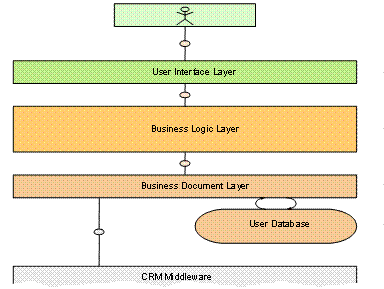
The generated output of the user interface and business logic frameworks (.DLL files) are required to execute and use the mobile client application. Framework DLLs enable:
· Data binding and data flow between the user interface and business logic
· Navigation within the user interfaces by application user
The Calendar Control framework provides support to define the appearance and functionality of the calendar, which is used in the Mobile Sales and Mobile Service applications.

For more
information about user interface and business logic concepts, see  SAP Mobile Application
Studio.
SAP Mobile Application
Studio.
For more information about application programming interfaces (API) of user interface, see UIFrameworkAPI40.chm, UFIPlugins.chm, and SpecialControlsAPI.chm available in the <Installation path>\bin folder, where the default installation path is C:\Program Files\SAP\mobile.
For more
information about concepts and API of Calendar Control, see Calendar
Control.