
 Utility Contract Processing in the Portal
(Sing.Contr. Mod.)
Utility Contract Processing in the Portal
(Sing.Contr. Mod.) 
Purpose
With this business process you can use the People-Centric UI (Key Account Manager Portal) to enter contract data directly in SAP CRM, if the utility company uses the single contract model. The basis for the utility contract is the utility quotation that was created in advance via the Key Account Manager Portal in SAP CRM (see Utility Quotation Processing in People-Centric UI (Single Contract Model)), and whose data can be transferred automatically.
Prerequisites
You have held successful contract negotiations, after which the customer has accepted the utility quotation.
Process Flow
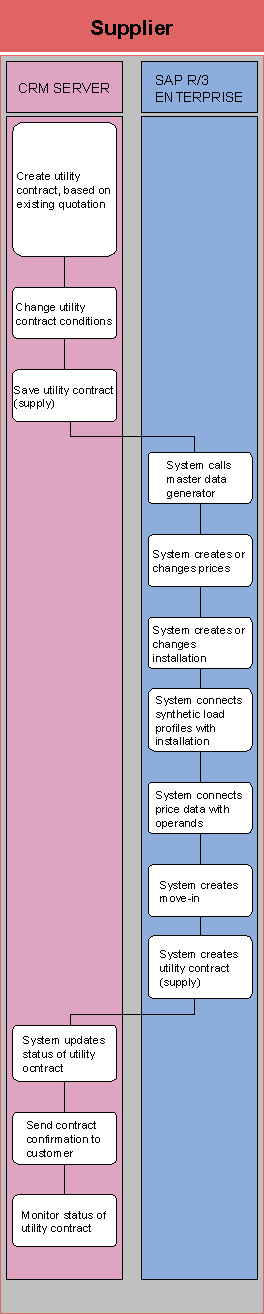
...
1.
Create a
utility contract based on the existing quotation
You use the Key Account Manager Portal in SAP CRM to create the utility
contract, based on the existing utility quotation.
2.
Change
utility contract conditions
You enter or change some contract conditions, such as the runtime of the
contract or agreed service).
3.
Save utility
contract (supply)
You save the utility contract.
4.
System calls
the master data generator
When you save the utility contract in SAP CRM, the master data generator is
called in SAP IS-U (SAP R/3 Enterprise). This automatically creates master
data, such as business partner and contract.
5.
System
creates or changes prices
In SAP IS-U, the prices belonging to the affected utility contract are created
or changed.
6.
System
creates or changes installation
In SAP IS-U, the installation belonging to the affected contract is created or
changed.
7.
System
connects synthetic load profiles with installation
In SAP IS-U, the synthetic load profiles are connected with the
installation.
8.
System
connects price data with operands
In SAP IS-U, the price data is connected to the corresponding
operands.
9.
System
creates move-in
In SAP IS-U, a move-in is automatically executed, which links the utility
contract with the installation.
10.
System
creates utility contract (supply)
The move-in is used to create a utility contract.
11.
System
updates utility contract status
The utility contract status is updated in SAP CRM.
12.
Send contract
confirmation to customer
You send a contract confirmation (welcome letter) from SAP CRM to the
customer.
13.
Monitor
status of utility contract
You use the Key Account Manager Portal to monitor the status of the utility
contract.
Result
The utility contract is created in SAP CRM. The whole business and technical data model is created in SAP IS-U. In addition, an outline contract (optional) from the quotation processing, and contract-specific prices exist in SAP IS-U. The data construct generated in this manner is, therefore, complete and billable.