
 Shift Management
Use
The continual and safe use of much technical equipment can only be assured by means of shift work. For this reason, the Shift Management process enables you to manage shifts within your company based on organizational and human resource planning.
Prerequisites
The organizational and human resource planning is carried out in the Human Resources (HR) component.
Process Flow
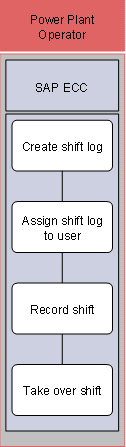
The following business process runs in SAP ECC:
1. Create shift log
The system saves the shift log master data such as Technical Reference Object, Work Centers Responsible, or Shift Model. The system proposes these entries when you create a page in a shift log.
2. Assign shift log to user
The system can contain multiple shift logs. You can personalize your user master record with the relevant shift log. This makes it easier for you to access the relevant log.
3. Record shift
A new page is created in the shift log for every shift. You can record all activities and events here.
4. Take over shift
When the shift changes, the current page in the shift log is closed and another is created. Open activities from previous shifts are copied to the new shift.
Result
Shift Management provides you with information, which you can use to optimize your maintenance strategy and which you can use if you are required to retain documents for inspection.