Report Category
Definition
Structural grouping of reports
Use
You use this to group reports together in a structural manner. You can build a report structure as a flat hierarchy or two-leveled hierarchy. A report structure allows you to organize reports logically for efficient access.
Structure
SAP has not defined any standards for grouping these reports. The grouping may vary depending on your company requirements. SAP provides you with the following categories or subcategories:
· Print Out Reports
· Standard Reports
· Microsoft Excel reports – Reports created using the data from a Microsoft Excel spreadsheet.
· SAP Business Information Warehouse reports – Reports downloaded from the SAP Business Information Warehouse. These reports contain large amounts of information about operative and historical data, for example, the World Sales Report detailing the sum of last year’s sales made by the top five countries.
The Standard and Print Out reports may have subcategories. For example,
· Analysis
· Dossiers
· Lists
· Workbooks

You can change the existing
categories and subcategories. You can also add categories and subcategories.
To do this, use the Choice Fields function. For
more information, refer to the topic  Choice Field
Maintenance.
Choice Field
Maintenance.
Example
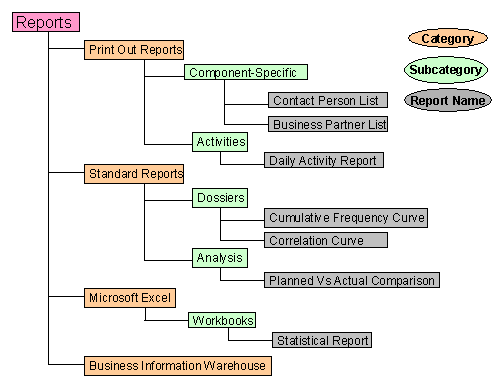
This diagram represents a report structure with categories and subcategories.
The structure described in this example may differ across companies.