
 CRM Content Management
Purpose
High-performance Content Management is an important component of a successful CRM landscape. In CRM Content Management, you can enhance CRM business objects such as products, product catalogs or business partners with “unstructured” data such as documents, graphics, or multi-media objects.
Prerequisites
· You have used transaction SICF to create an external alias '/default_host/sap/bc/contentserver', which contains anonymous logon data and refers to the target element '/default_host/sap/bc/contentserver'.
To display documents in the People-Centric UI, the system requires anonymous logon data for the service /default_host/sap/bc/contentserver for HTTP access to the content server.
· The service '/default_host/sap/bc/contentserver' is active.
Features
When processing business objects, the system accesses the relevant Content Management functions.
SAP Content Management provides the following functions:
·
Integration of the user interface
with the different CRM applications. See  Document
Processing and Content
Management.
Document
Processing and Content
Management.
·
Linking of
content and business objects.
See Linking Content
Objects and Business Objects and Exchanging Documents
with the Mobile Client.
·
Technical
Content Management functions such as folder management and saving content to
content servers.
See Content
Servers.
· Content saving to a database
·
Content versioning. See Version
Management.
· Grouping of thematically-connected content objects by using folder templates
To use folders and documents in the different applications, you can define folder templates, which, in turn, must be assigned to the relevant business object types. You can find more information in the Implementation Guide for Customer Relationship Management under ®Basic Functions ® Content Management ® Define Templates for Folders.
· Metadata management
· Integration with the ArchiveLink functionality.
In Customizing, you can define which documentation for the appropriate business objects is linked to the ArchiveLink functions. To do this, in Customizing, select the Web Application Server ® SAP Web Application Server ® Basis Services ® ArchiveLink. Additionally, you can create ArchiveLink documents from Content Management.
· Integration of Internet documents by entering the appropriate URLs
· Import and export of documents
· Where-Used list: You can display a list of all business objects to which a given document is assigned.
· Content search: You can search for all the documents in Content Management, that is, you can also search for documents that belong to other business objects.
Special Features for the SAP GUI
· Import and export of documents with blocking function
· Creation of personal- and generally visible notes at document level
· Document templates:
You can define templates for your documents that will be available to you later in Content Management. For more information, see the Implementation Guide under Customer Relationship Management ® Basic Functions ® Content Management ® Define Document Templates.
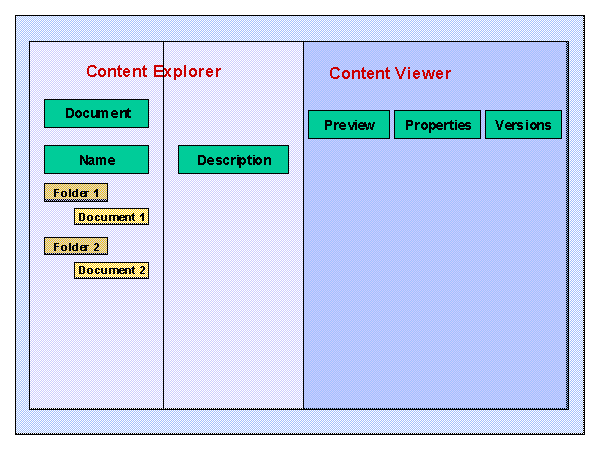
The graphic shows the layout of the Content Management interface.
Special features for the People-Centric UI
· Personalizable display of document properties: Use the Personalize button to make a selection of all the available document properties.
· Import of documents to the People-Centric UI: To import documents, select Add, enter the document path and a name, and then select Add document. To export a document, open the corresponding document in the browser, select File -> Save as from the browser menu and enter the required target directory.
Constraints
Content Management can only be applied to the different areas of the CRM system. There is no cross-system integration outside of CRM, that is, content sharing with systems external to CRM is not possible.
Additional Information
For technical information on Content Management, see the SAP Help Portal under help.sap.com ® SAP R/3 and R/3 Enterprise ® SAP Library® SAP NetWeaver Components ® SAP Web Application Server ® Basis Services / Communication Interface (BC-SVR) ® Knowledge Provider (BC-SVR-KPR).