Installed Bases
Definition
An installed base can be described as a multilevel structure of installed base components for managing objects (for example, devices, machines, software) that are installed, or are going to be installed on site at the customer site. An installed base can represent the reference basis for services.
An installed base describes the hierarchical structure of these objects and their individual parts (components).
Use
Installed bases are suitable for storing your customer structures and the service-relevant objects installed at the customer site.
Service contracts can be made and service processes created with reference to installed bases or installed base components.
Interaction Center (IC) employees can search for and display installed base components during customer contact using partner, address or object data, or using the installed base number. Installed base components can be transferred to a list within the IC from which installed base components can be copied as reference objects to a service process.
Before calling at the customer site, or while at the customer site, field service representatives or service employees can display and change installed base data on mobile devices, such as laptops, and create new installed bases.
The customer’s employees can create installed bases or access existing ones using Internet Customer Self-Service (ICSS). They can also enter complaints and service requests for installed base components.
There are two basic scenarios for creating and maintaining installed bases:
· 1 installed base for x objects
You group all objects for a customer in one installed base. This option is particularly useful when substructures for the individual objects are less important.

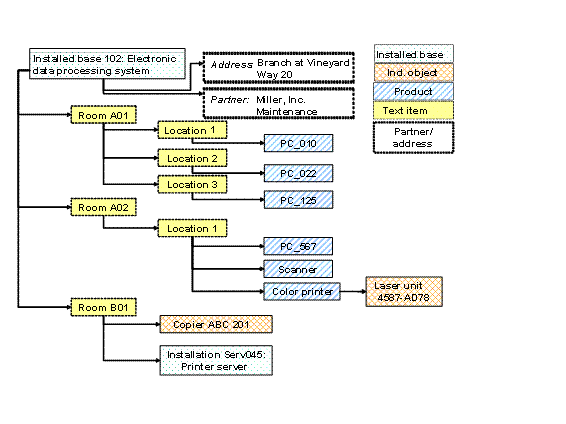
The complete data processing installed base at the customer site is managed as an installed base with several components. You are focusing on PCs and other items being installed and, for example, assigned to rooms or persons. The detailed structure of individual devices is not relevant.
· Installed base for 1 object
You create an installed base for each installed object (that is, for each device, each machine, all software, and so on) that is relevant for service. This option is especially useful if the substructure of individual objects is also important to you, for example, for replacement part orders for large machines.
Every computer, monitor, and printer for your customer’s data processing installed bases are managed as independent installed bases and described there in detail. In the installed base, you can assign the service-relevant parts of a PC (memory bank, hard drive, cards, and so on) to a PC as components.
Both scenarios can be combined. The structuring of installed objects should be planned in advance to achieve a clearly-presented installed base with no redundancy. For more information, see the Prerequisites section in Creating Installed Bases.
Structure
An installed base is displayed as a tree structure.
An installed base always has an internal ID number assigned by the system. You can also enter an alternative ID and a description.
An installed base consists of several parts:
· The installed base is itself a grouping unit, under which all of the parts (components) are grouped in a structure.

Installed Base means the entire installed base and all assigned objects. An installed base can itself also be a component of another installed base.
· The installed base components as parts within the installed base.
Validity intervals are formed when changes to the structure and components are made, so that a previous status can always be reconstructed.
Example
An installed base can be, for example, a kitchen appliance, an elevator in a building or all elevators in the buildings of the firm xy.
An installed base can also include a complex object, for example, an airplane with all service-relevant parts or an airplane that has not yet been constructed, whose parts should be managed as related parts from the planning and construction phase onwards.
An installed base can also include two wings, which should be integrated in the higher-level installed base Airplane after fabrication.
The installed base for a data processing installed base could look like this: