
 Row Pattern
A central component of the Enterprise Report Design is the row patter concept. It enables creation of reports with dynamic sections. With reports of this type, the number of characteristic values in the drilldown is not set at the time of report creation. It becomes visible during runtime.
Basics of Structuring Reports
In order to be able to understand the row pattern concept, you need to look at the structure of a report with dynamic sections:
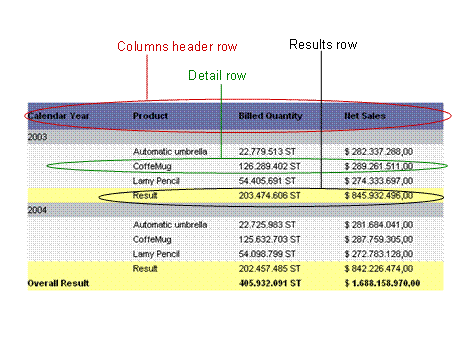
In the graphic above, you can see that a number of row types can be identified in a report. This means there is a specifically formatted row that is applied to column headers or a specifically formatted row for results values. For each row type, there is a template, called a row pattern, that describes the color, font, height and width of the rows, and so on.
Group Levels
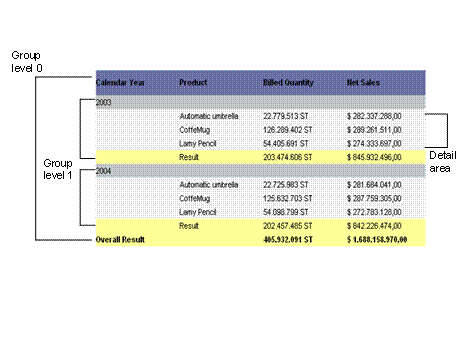
The graphic above shows the structure of a query in a report with characteristics, structures and hierarchies. The layout of a query is defined in the drilldown of the structure elements in the columns and rows of the query. Every structure element in the rows of the query corresponds to a group level in the row pattern concept. Thus the number of possible group levels in a report depends on the drilldown status of the query.
Structure of the Group Levels
Each group level comprises:
● Header area
● Detail area
● Footer area
The detail area itself can also represent a group level (with header and footer and a detail area). This is how group levels can be nested in each other. The innermost group level of a report has detail rows that contain key figures.
The Report Designer generates a row pattern for each area of a group level.

In the graphic, the rows of the calendar years correspond to the header area of group level 1.
Row Pattern
Row patterns are the smallest units of a BEx Report that are not divided by page boundaries. Row patterns comprise cell grids whose cells can have specific properties.
For more information, see Properties of Row Patterns.
Report Web Item
The Report
Web item uses the row pattern and data to generate the header, detail and
footer areas of a report. When the report is executed in the Report Designer,
the  Report Web
Item is called.
Report Web
Item is called.