
 Transport System
Purpose
Development projects for business intelligence are usually not performed in a productive system in most cases. Instead, they are carried out in one or – depending on your scope – in several development systems.
If your development projects are carried out in one development system you have to transport the development to the target system (a test or productive system).
You can collect the newly created or changed objects for business intelligence in the respective development system using the transport connection. Then you can transport them with the Change and Transport Organizer (CTO).

For more information about the SAP Change and Transport System (CTS), see
Process Flow
The following diagram illustrates the transport process:
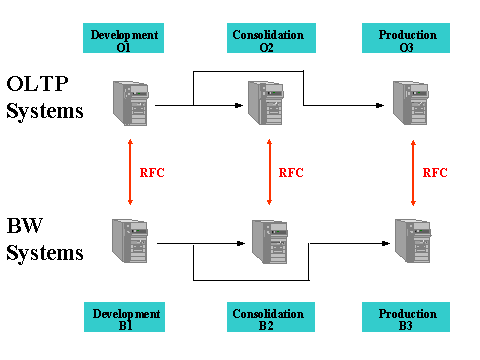
A typical system landscape is made up of a development system, a consolidation system and a productive system. You can only transport between either OLTP systems (O1,O2,O3) or between BI systems (B1,B2,B3). Communication between OLTP systems and BI systems takes place using the RFC (Remote Function Call) during uploading.
...
1. Extractor enhancements and metadata changes are automatically written to transport requests in OLTP systems. These have to be transported from the OLTP development system into the OLTP consolidation system and for here into the OLTP productive system.
2. To be able to transport objects specific to the source system, for example transfer structures, you need to maintain the mapping table in the BI target system. Transfer rules and DataSources are converted during the transport using mapping tables.
For more
information about the special features of source-system objects in the
Customer Content, see the documentation on  Transport and Delivery
of Source-System Dependent Objects.
Transport and Delivery
of Source-System Dependent Objects.
a.
The Data
Warehousing Workbench: Transport Connection screen is displayed. Choose
 Conversion with quick info
Conversion of Log. System Name. The View: “Conversion of
Source System Names After the Transport” screen appears.
Conversion with quick info
Conversion of Log. System Name. The View: “Conversion of
Source System Names After the Transport” screen appears.
On the Data Warehousing Workbench: Modeling screen, choose Tools -> Conversion of the Logical System Names. The View: “Conversion of Source System Names After the Transport” screen appears.
b. Conversions that have already been made are displayed in the mapping table: A Original Source System is generally the OLTP development system. The Target Source System is the OLTP system that is connected with the BI target system. Click on New Entries to get to the New Entries: Overview of Added Entries screen. Specify the logical system name you want for the source systems before and after the transport. You can use input help to select a logical system name for the target source system. Or you can create a new value.
3. To maintain system consistency, DataSource metadata from the BI development system is not transported into the following BI systems. You must copy DataSource metadata from the respective OLTP system into each BI system again.
Copy the metadata prior to the first transport between BI systems (B1 in B2, B2 in B3) from the connected OLTP system into the corresponding BI target system.

When a transfer structure is transported for example, it cannot be activated unless the corresponding DataSource is already in the target system.
4. Servers with a smaller configuration are sufficient as consolidation systems. In this system, the customer can test how the transports affect system functions.
5. BI objects are transported as logical objects (TLOGO objects) from a source system into a target system. You can find an overview of transport-relevant metadata object types in business intelligence at Transport-Relevant Metadata Object Types.
You can change objects of a specific object type even in systems set globally to “not changeable”:
i.
The Data
Warehousing Workbench: Transport Connection screen is displayed. Choose
 Object Changeability. The
Changeability of Object Types screen appears (If System Cannot Be
Changed). The system
displays all object types that you can set to “changeable”. (This
does not include structural objects, for example InfoCubes).
Object Changeability. The
Changeability of Object Types screen appears (If System Cannot Be
Changed). The system
displays all object types that you can set to “changeable”. (This
does not include structural objects, for example InfoCubes).
ii. Double-click on the object type to make it changeable.
iii.
Choose  Continue.

Note that these objects are no longer connected to the transport system. For this reason, we only recommend this process in productive systems.
6. You can choose between the following transport strategies:
- Standard transport system
- BI transport system
For more information about the advantages of using each of these processes, see Standard- and BI Transport Connections (a Comparison).