
 Authorization Dimension
Use
An authorization comprises multiple dimensions. A dimension of an authorization is a characteristic or a navigation attribute.
Features
You can authorize characteristics and navigation attributes independently of one another.
An authorization dimension includes a set of values, intervals and hierarchy authorizations.
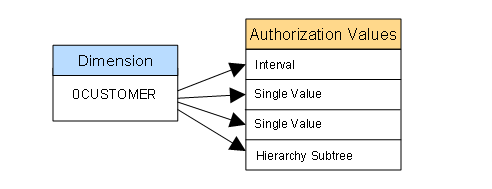
You can add any number of characteristic and navigation attributes to an authorization as dimensions and authorize single values, intervals, simple patterns, variables and hierarchy nodes.
In order to see aggregated values, such as totals rows, the authorization is required for aggregated values that are indicated with a colon (I EQ :).
The pound sign (I EQ #) stands for non-assigned values.
For patterns, only the ones that end with a single pattern symbol, that is the asterisk (*) for any character string or the plus sign (+) for exactly one character. The only exception to this is the characteristic 0TCAVALID for the validity period.
Exclusion definitions (negative authorizations) are not possible; all authorizations have to be positively defined. The only exception to this is the characteristic 0TCAVALID for the validity period.
Special Dimensions
In addition to these generic dimensions, an authorization includes special dimensions. These comprise the characteristics 0TCAACTVT (activity), 0INFOPROV (InfoProvider) and 0TCAVALID (validity). These special characteristics have to be present in at least one authorization of a user, otherwise the user does not have authorization to execute a query.
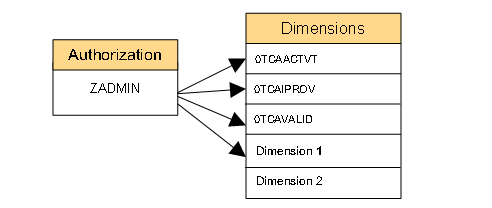

SAP recommends including these special characteristics in every authorization.
You do not need to add them to every specific authorization, but we recommend it for reasons of clarity and security of analysis.

These special characteristics may not be used in queries.
The special characteristics are delivered with the BI Content and are activated automatically. However, they are not yet designated as authorization relevant. You need to set this indicator yourself in InfoObject maintenance before you use the characteristics in authorizations.
With the characteristics 0TCAACTVT (activity), you can restrict the authorization to different activities. Read (03) is the default activity.
With the characteristics 0TCAIPROV (InfoProvider), you can restrict the authorization to individual InfoProviders. The default is that all InfoProviders are authorized with the asterisk (*). It maps the structure of the InfoProvider store in the Data Warehousing Workbench with its master data and the hierarchy characteristic for InfoArea. In this way it is also possible to assign authorizations for entire InfoAreas. Note that there could be performance deficits when this type of authorization assignment is used.
With the characteristic 0TCAVALID (validity), you can restrict the validity of an authorization. Always valid (*) is set as the default for validity. You can restrict this validity. You can also specify a single value or an interval. With single values, the relational operator is set to EQ (equal to) during the check. With intervals, you have a larger selection of relational operators than with other characteristics so that you can set the validity very accurately. You can use the following pattern here: * (asterisk) for any number of characters or + (plus) for exactly one character. For single-digit information for days and months with patter, continue to use the two-digit display. For example 0+/12/2005 if you want to authorize the December 1-9, 2005.

In the following example, the authorization is restricted to the 1st --10th of a month for the year 2004, respectively.
Including/Excluding |
Operator |
Technical Characteristic Value (from) |
Technical Characteristic Value (to) |
I |
BT |
01/++/2004 |
10/++/2004 |
In the following example, the authorization is only valid until 12/31/2004.
Including/Excluding |
Operator |
Technical Characteristic Value (from) |
Technical Characteristic Value (to) |
I |
LE |
12/31/2004 |
|
The characteristic 0TCAKYFNM is the special characteristic for key figure authorizations (with the previous concept of reporting authorizations there was the technical characteristic 1KYFNM for this purpose). Authorizations are created and checked for this special characteristic if key figure authorizations are required. Hierarchy authorizations cannot be used on 0TCAKYFNM.

Whenever this characteristic is authorization relevant, it is checked. This means you should only mark it as authorization relevant after careful consideration.