
 Scheduling and Schedule Strategies
Use
You can choose the scheduling service you want to use to support back-end processing within the service resource planner application.
Integration
Prerequisites
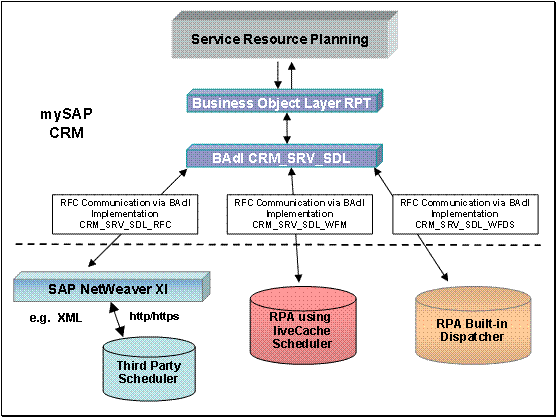
You have set the scheduling engine you are using for your implementation of Service Resource Planning by choosing SAP IMG ® Customer Relationship Management ® Workforce Deployment ® General Settings for Service Resource Planning ® Select Scheduling Engine
You have defined whether you are using liveCache or the resource planning application built-in dispatcher by choosing SAP IMG ® Customer Relationship Management ® Workforce Deployment ® Workforce Deployment Server ® Dispatcher Settings ® Switch between liveCache and Built-in Dispatcher
You have set the scheduling strategies:
· If you are using liveCache within your scheduling solution, choose SAP IMG ® Customer Relationship Management ® Workforce Deployment ® Workforce Deployment Server ® Dispatcher Settings ® liveCache Scheduling Strategy
· If you are using the built-in dispatcher, choose SAP IMG ® Customer Relationship Management ® Workforce Deployment ® Workforce Deployment Server ® Dispatcher Settings ® Scheduling Strategy
· You have entered a strategy by choosing Workforce Management ® Resource Planning from the resource planner’s portal and then choosing Schedule Strategy from the Personalize area Scheduling using strategies works for service order items only.
If you are using an external scheduling solution, you have integrated the solution to the resource planning application. For more information, see SAP Help ® Customer Relationship Management ® Service Resource Planning ® Scheduling Engine Interface.
Features
Scheduling Engines for Service Resource Planning
Scheduling Engine |
Description |
Features |
Resource Planner Application using liveCache scheduler |
A memory-based database which includes multiple scheduling algorithms. |
· Schedules project-based demands. · Uses external service providers with capacity type overall or equally distributed · Utilizes multiple scheduling strategies · Provides Groupware connection · Generates appointment scheduling · Uses Find and rank processing |
Resource Planner Application with built-in dispatcher |
Uses conventional techniques for data storage, and includes only one scheduling algorithm. |
· Supports service order based demands and appointment scheduling · Uses Find and rank processing · Provides Groupware connection |
Connection to an external scheduling engine |
Supplied by third-party within connections through SAP NetWeaver XI |
Ability to choose complete capabilities within the scheduling scenario |
Scheduling Strategy
The most important attribute of the scheduling engine are the its scheduling rules which define the overall planning strategy.
Schedule Rules Supported by liveCache Dispatcher
Rule |
Description |
Find Slot |
The system attempts to schedule the demand in the next possible free time slot for a resource, in the planning direction. The utilization of the resource takes into consideration existing concrete and capacitive assignments. If the scheduler is called with more than one resource, the system creates the assignment depending on the planning direction. For forward scheduling, the earliest time slot is used to create the assignment, whereas for backward scheduling, the latest time slot is used. |
Append Assignment |
The system attempts to schedule the demand after the last assignment of the given resource. This scheduling rule must be used with care, especially when you have assignments in the distant future (for example, on-going maintenance orders). If the last assignment does not appear in the planning board, the appended assignment does not appear on it either. |
Infinite Planning |
The system schedules the demand on the required date, without accounting for the existing resource load. Only the availability of the resources is taken into account. This can be used as a fall-back scheduling rule, if the Find Slot scheduling rule does not return a valid assignment. |
While you set the strategies through the SAP IMG, you reference them within the resource planner application. At the Resource Planning page, choose Personalize. You see the Settings page. In the Schedule Strategy area, choose the schedule strategy from the Strategy drop down list.