
 Data Warehousing Workbench
Purpose
The Data Warehousing Workbench (DWB) is the central tool for performing the tasks in the data warehousing process. It provides data modeling functions as well as functions for control, monitoring and maintenance of all processes in SAP NetWeaver BI having to do with data procurement, data retention, and data processing.
Structure of the Data Warehousing Workbench
The following graphic shows the structure of the Data Warehousing Workbench:
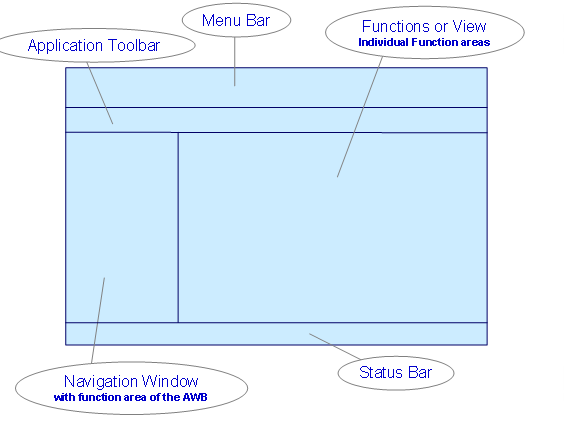
Navigation Window with Functional Areas of the Data Warehousing Workbench
When you call the Data Warehousing Workbench, a navigation window appears on the left of the screen. You can open the individual functional areas of the Data Warehousing Workbench with the application toolbar in the navigation window.The applications that are available in these areas are displayed in the navigation window; in the modeling functional area the possible views on the object trees are displayed.
Object Trees or Applications of the Individual Functional Areas
If object trees or applications are assigned to a functional area in the navigation window, they can be called by simply clicking in the right part of the screen.
Application Toolbar
The toolbar of the Data Warehousing Workbench contains a pushbutton for showing or hiding the navigation window as well as pushbuttons that are relevant in the context of the individual functional areas and applications.
Menu Bar
The possible function calls with the menu bar of the Data Warehousing Workbench are independent of the functional areas.
Status Bar
The status bar shows information, warnings and error messages.
Features
Functional Areas of the Data Warehousing Workbench
Functional Area |
You can find documentation under |
Modeling |
|
Administration |
|
Transport connection |
|
Documents |
|
Business Content |
|
Translation |
|
Metadata Repository |
 Modeling