DB Connect Architecture
The multi-connect functions that are delivered as a SAP NetWeaver component, allow you to open extra database connections in addition to the SAP default connection, and use these connections to access external databases.

For more information, see SAP Note 323151 – Multiple DB Connections with Native SQL.
DB Connect also offers you the option of using this type of connection as a source system connection for a BW system and of using tables or views from a database to generate DataSources. DB Connect also allows you to map database data-types to data types in the ABAP dictionary. The enhancement that DB Connect makes to the database interface enables you to transfer data from external applications in the respective database tables or views directly into the BW system.
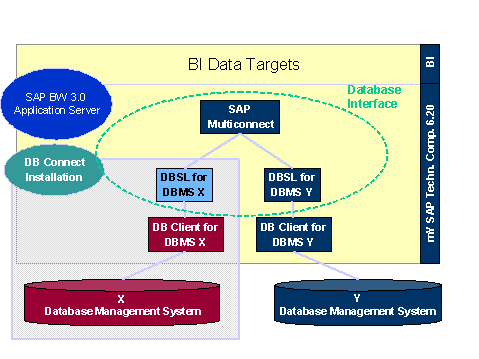
For the default connection, DB Client and DBSL are preinstalled for the database management system. If you want to use DB Connect to transfer data from other database management systems into the BW system, you need to install both the database-specific DB Client and the database-specific DBSL on the BW application server that will be used to run DB connect.
In the following graphic, the BW system runs on the DBMS Y. You do not, therefore, need to install DBSL and DB Client for the source DBMS Y. However, if you want to load data from a DBMS X table or view, you need to install DBSL and DB Client for the DBMS X.