
 Inspection of Installations
Use
With this business process, you can carry out an initial inspection of technical installations and equipment in order to create the requirements for a periodic inspection. You can also create the inspection list in the form of campaigns and create inspection orders and notifications. You can also enter inspections that have already been executed. This creates the requirements for the next periodic inspection.
Process Flow
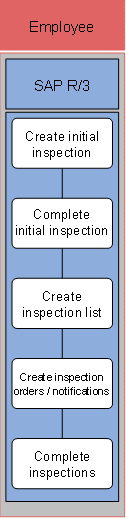
The following business process runs in SAP IS-U/CCS:
1. Create initial inspection
In this step, you create a new technical installation and the corresponding initial inspection order for an existing premise.
2. Complete initial inspection
In this step, you complete the initial inspection order and set the data of the last inspection for the technical installation. This means that the technical installation is available for the periodic inspection.
3. Create inspection list
In this step, you create a campaign in the inspection list, which all technical installations and equipment that you want to inspect.
4. Create inspection orders/notifications
In this step, you create inspection orders or inspection notifications for technical installations or equipment from the inspection list.
5. Complete inspections
In this step, you complete inspection orders or notifications and set the date of the last inspection for the relevant technical installation or equipment.