
 Creating Target Groups from
External Lists
Creating Target Groups from
External Lists 
Usage
Prerequisites
· You have created a data source with origin type External List Management in transaction Maintain Data Sources for Segment Builder in the CRM system. Pay attention to the following when creating your data source:
¡ RFC connection: The data source needs an RFC connection to the BI system.
¡
InfoSet
name: An InfoSet
is executed in the BI system by RFC. This InfoSet selects the data from both
of the master data objects 0ELM_GUID_H and 0ELM_GUID_I. In the SAP standard
system, InfoSet  ELM_INFOSET is
provided in the BI system. You can use or copy this InfoSet.
ELM_INFOSET is
provided in the BI system. You can use or copy this InfoSet.
¡ Business partner: Remember that this does not contain the GUID of the business partner, but rather the GUID for a row from the master data object 0ELM_GUID_I (attribute 0ELM_GUID_I). The SAP standard proposes field ELM_INFOSET_STRUCTURE-ITEM_GUID.
¡ Mapping format: The fields in the InfoSet must be mapped to the fields of the CRM structures. For this, use F4 to select the appropriate mapping format. The SAP standard provides mapping format 0ELM_I.
· You must define at least one selection attribute list for the new data source.
· The Customizing settings for list type and list origin must be identical in both the BI system and CRM system. For more information, see the relevant IMG documentation in the BI and CRM system.
Features
In the BI
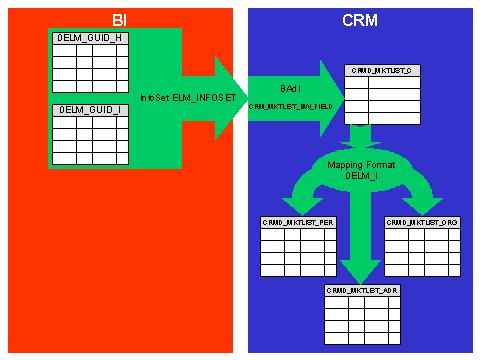
system in the SAP standard, the data from 0ELM_GUID_H and 0ELM_GUID_I are
selected using InfoSet ELM_INFOSET. In
the CRM system, the data is mapped using the default implementation of the
Business Add-In CRM_MKTLIST_BW_FIELD from the structure of the BI InfoSet to
the structure of the CRM intermediate table. The data is stored in this
intermediate table until the business partners and the target group have been
created.
The standard functions of External List Management are used in CRM to create the business partners. For this, the data is read from the intermediate table and transferred to the structures for the creation of business partners. The SAP standard provides mapping format 0ELM_I for this step.

If you change the master data objects 0ELM_GUID_H and 0ELM_GUID_I (for example, by adding further attributes), you must do the following:
· In the BI system, copy the InfoSet ELM_INFOSET and select the new fields in the read program accordingly
· In the CRM system, create a user-specific implementation for Business Add-In CRM_MKTLIST_BW_FIELD
· In the CRM system, extend the following structures with the new fields in 0ELM_GUID_H and 0ELM_GUID_I
¡ CRMT_MKTLIST_ADR_EXT
¡ CRMT_MKTLIST_PER_EXT
¡ CRMT_MKTLIST_ORG_EXT
¡ CRMT_MKTLIST_CP_EXT
¡ CRMT_MKTLIST_CUSTOMER_EXT
· In the CRM system, create a user-specific implementation for Business Add-In CRM_MKTLIST_CUSTOMER, if fields are added to structure CRMT_MKTLIST_CUSTOMER_EXT
· in the CRM system, create a user-specific implementation of Business Add-In CRM_MKTLIST_BADI, if fields are added to the structures CRMT_MKTLIST_ADR_EXT, CRMT_MKTLIST_PER_EXT, CRMT_MKTLIST_ORG_EXT or CRMT_MKTLIST_CP_EXT
Activities
· In the Segment Builder, create a profile with selection criteria from the attribute list.
· If you create the target group for the profile, the data will be read from master data objects 0ELM_GUID_H and 0ELM_GUID_I in the BI system and copied to CRM. The system checks whether a business partner already exists for each data record. If no business partner exists in CRM, a business partner is created from the data record. The business partners are then assigned to the target group. Before creation of the business partners, the system controls whether the address list already exists in the CRM system. If the address list does not exist, then the data from 0ELM_GUID_H is used to create the address list. Every selected address data record from 0ELM_GUID_I is assigned to the address list with its row GUID (attribute 0ELM_GUID_I) and the corresponding business partner GUID. This information is needed for subsequent selections, for deletion of business partners, and for Reporting.
· Creation of a target group containing an attribute list of type External List Management is allowed only in batch mode due to performance reasons. There is a special handling of the address lists created in ELM in the Segment Builder. For more information, see Segmentation ® Segment Builder ® Segmentation of Data from External List Management.