
 Sales Processing
Use
You use this business process to map the sales processing for the service connection. You can provide the customer with a quotation, create a request for a down payment, and create a sales order. At the end of the process, you settle the costs for your service by billing the customer using flat-rate billing or resource-related invoicing.
The process is supported by a workflow.
Process Flow
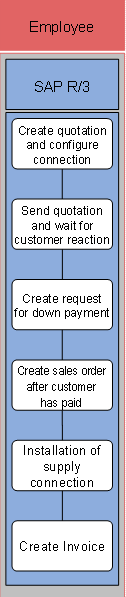
The following business process runs in SAP IS-U/CCS:
1. Create quotation and configure connection
At the start of the process, you create a quotation for installing a service connection. If you use a configurable service product, you can fully generate the quotation in the background by evaluating a small number of self-defined characteristics.
2. Send quotation and wait for customer reaction
3. Create request for down payment
If the customer accepts the quotation, you can create a request for down payment.
4. Create sales order after customer has paid
As soon as the customer has paid the down payment, create a sales order using the quotation as a template.
5. Start subprocess Installation of house connection
Use the Installation of house connection process to execute technical installation and to create the connection as an equipment master record.
6. Create invoice
Once all the technical work is complete, create an invoice for the customer. This can be flat-rate or resource-related.