
 Campaign Preparation
Purpose
You can use this business process to prepare everything you need to run a campaign. When preparing a campaign, the following questions should be considered:
What should be marketed?
Who should the campaign address?
Which conditions are being offered in the framework of this campaign?
The Marketing Planner allows every aspect of your campaign to be prepared using one tool which is fully integrated with SAP BW, SAP SEM and the SAP R/3 System.
Prerequisites
Before campaign planning can start, the following Customizing settings need to be made for Marketing Planning and Campaign Management:
· System Landscape
· General Settings
· User Interface Settings
· Basic Data
Process Flow
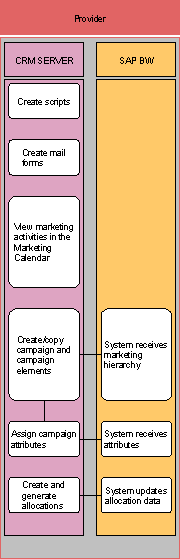
...
1.
Defining the
method of communication:
You decide which method you are going to use to carry out a campaign, for
example, an e-mail campaign or a telephone campaign. Once this decision has
been made, you need to define this method, for example, you can set up a
script. This script is then used in the Interaction Center when contacting
potential customers.
2.
Viewing your
campaigns in the Marketing Calendar:
The Marketing Calendar is the first point of entry for setting up your actual
campaign. You can use it to get an overview of all your campaigns so that you
can see where/if they overlap and from here, you can link your campaign to
related promotions. You can also create new campaigns or promotions directly
from this screen.
3.
Creating or
copying campaigns and campaign elements:
Campaigns and campaign elements are created or copied in the Marketing Planner
which can either be accessed directly or via the Marketing Calendar. The
Marketing Planner allows you to carry out all of the necessary steps for
planning a campaign, right up to the point where you execute the campaign. For
example, this is the place where you assign all of the necessary attributes
such as target groups, products and so on. This is also the place where you
can carry out in-place analysis of your campaign data. You can analyze the
budget available for a campaign or the success of your campaign once it has
been executed. All of this information is updated in SAP SEM and SAP BW for
reporting purposes.
4.
Creating and
generating allocations:
Allocation planning is a further tool available that allows you to determine
how you are going to distribute a set number of resources to the people that
you wish to contact. For example, if you had a limited number of products that
are available, you can use it to determine how many products each store should
receive.