
 Example: Rounding (With RBA - Not Enough Stock
Available)
Example: Rounding (With RBA - Not Enough Stock
Available) 
The following example illustrates how the results of rounding quantities are displayed in the sales order.
The following criteria apply:
Location |
Package Unit |
Rounding Rule |
Available Stock |
1000 |
6 pc / 12 pc / 18 pc |
Up |
10 pc |
The availability check includes a rules-based ATP check (RBA).
Not enough stock is available.
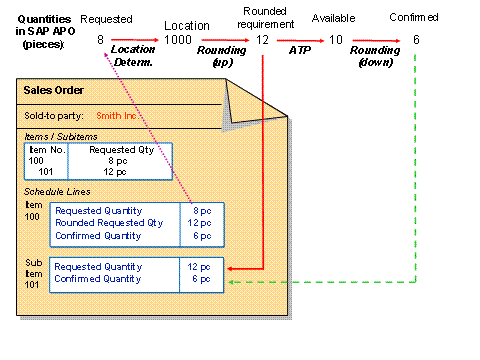
...
1. The requested quantity for the sales order item is 8 pc.
2. The system carries out location determination and determines location 1000.
It creates a subitem for location 1000 (as a result of the rules-based availability check).
3. For location 1000, the system rounds the 8 pc up to 12 pc. The system displays this in the subitem in the schedule line for the requested quantity, and summarizes it in the main item in the schedule line for the rounded requested quantity
4. Only 10 pc are available. Therefore, the availability check can only confirm 10 pc.
5. The system rounds the 10 pc down to the next package unit, which is 6 pc.
6. The requested quantity is higher than the confirmed quantity. Therefore, there is an outstanding requirement of 2 pc.