
 Step 2:
Storing Archive Files
Step 2:
Storing Archive Files 
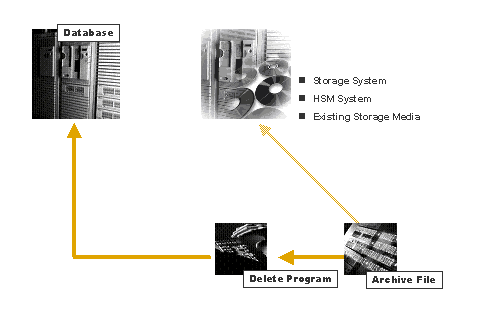
Once the write program has finished creating archive files, these can be stored.
There are several ways of storing archive files:
·
Storage Systems:
If a storage system is connected to mySAP Business Suite: At the end of a
successful write job, a request is sent to this system to store the new
archive files (provided the appropriate settings were made in Archiving
Object-Specific Customizing. You can also store archive files manually at
a later point if you do not want them to be stored automatically. Storage is
carried out by the SAP Content Management Infrastructure (which contains the
ArchiveLink/CMS interface).
·
HSM Systems
If you use an HSM system, it is sufficient to maintain the file name in
Customizing (Transaction FILE). You
do not then need to communicate with the storage system using the SAP Content
Management Infrastructure, because the HSM system stores the files on suitable
storage media according to access frequency and storage space.
·
Existing Storage
Media
Once the delete program has processed the relevant archive file, you can
manually copy archive files to tape.
For more information, refer to File Storage in Storage System und Storing Archive Files.
See also: