
 Example of Use of Grid Products
In the following example, all steps that play a significant part in the use of grid products are described with example data.
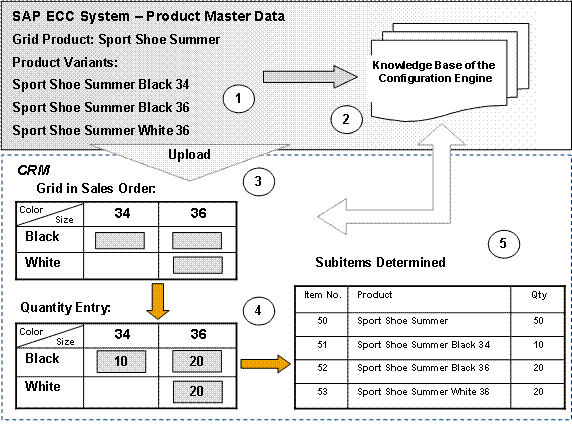
Your customer would like to order 50 pairs of sport shoes of the type 'Sport Shoe Summer'.
This is a grid product. This means that there is a special product category that – similar to a configurable product – can possess certain characteristic combinations, but can only differ in a maximum of three characteristics, and is therefore less complex. This sport shoe is available in sizes 34 and 36, and in the colors white and black, but the combination of size 34 with color white is not offered.
The corresponding product variants for this sport shoe were created in the product master data in an SAP ECC system, and the knowledge base was automatically built up from it in the Configuration Engine (see points 1 and 2 in the graphic).
When you enter a grid product in the sales order on main item level, you can go to a tab page with the name Grid. A grid with the possible characteristic combinations is shown on the tab page (see point 3 in graphic). The characteristic attributes displayed correspond to the maintained product variants, and are prepared by the Configuration Engine using the knowledge base.
If you have already entered a total quantity of the grid product on main item level, this quantity appears as a default value for the automatic distribution of quantities, which you can trigger using the Distribute pushbutton. This function makes it possible for you to distribute large quantities quickly and easily. For example, you can take into account in your distribution logic that in ladies' shoes, size 36 is more common and therefore higher quantities should be determined.
After you have used Transfer to confirm the quantities entered, the Configuration Engine determines the corresponding variants, and the system creates the corresponding subitems in the sales order (see point 5 in the graphic).