
 Self-Service Support Through FAQ and Solution
Search
Self-Service Support Through FAQ and Solution
Search 
Purpose
Your customers use this process when they want to find information or need to solve a product problem. They visit your Internet Customer Self-Service (ICSS) and try to find for solutions through searches of frequently asked questions (FAQ Search) and knowledge bases (Solution Search).
They start with Frequently Asked Questions (FAQs) designed to address common product issues faced by customers. FAQs are sorted by product. Each FAQ is linked to a list of solutions.
If an FAQ Search does not result in successful problem resolution, customers can use the Solution Search. They enter a description of their problem and perform a search to retrieve a list of problems from your knowledge bases. Each problem is linked to a list of solutions.
FAQ Search and Solution Search are self-service tools that reduce interaction costs, increase customer satisfaction, and improve efficiency and profitability.
Prerequisites
· You have installed the TREX index server and the Software Agent Framework (SAF) components. You use the SAF to create and compile database records pertaining to problems and solutions in the TREX search engine.To install these components, see the CRM Software Agent Framework Installation Guide in the SAP Service Marketplace.
· You have configured the ICSS Java application (using XCM in the Administration Console) and the CRM backend application for FAQs and product selection as explained in the Internet Customer Self-Service JAVA Application Guide.
Process Flow
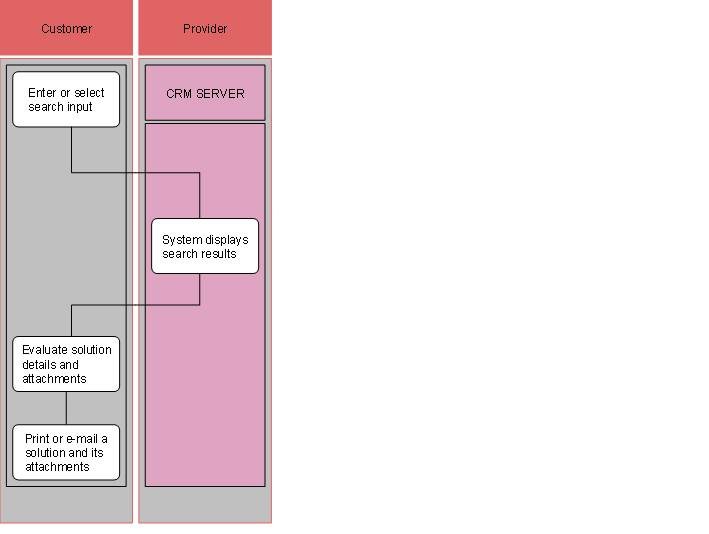
1. Enter or select search input
2. System displays search results
3. Evaluate solution details and attachments
4. Print or e-mail a solution and its attachments