 InfoSource Types

InfoSource Types
There are basically two types of InfoSources.
In both cases uploaded data is transformed by the transfer rules, which have been created for the current combination of InfoSource and source system and for each InfoObject of the communication structure. A data target can be defined by several InfoSources which in turn can be defined by several source systems.

An InfoSource for hierarchies can only be defined by one source system.
For characteristics, attributes or texts, a combination of flexible and direct updating is only possible for different source systems.
InfoSources with Flexible Updating
For an InfoSource with flexible updating, the data from the communications structure is loaded into the data targets (InfoCubes, ODS objects, master data) using
update rules. Several data targets can be defined by one InfoSource. The InfoSource can contain transaction data as well as master data.
This function is not implemented for hierarchies.
Before Release 3.0A only transaction data could be updated flexibly and it was only possible to update master data directly. Master data InfoSources were therefore distinguished from transaction data InfoSources. This is no longer the case as of Release BW 3.0A, since both transaction data and master data can be updated flexibly. You therefore cannot immediately see if it the InfoSource handles transaction data or master data with flexible updating. You should therefore specify which is the case when you define an InfoSource.
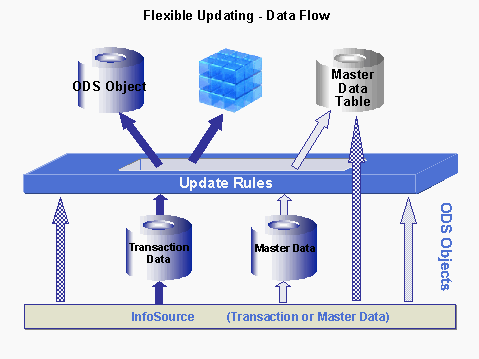
You have the following update options:
InfoSources with Direct Updating
Master data (characteristics with attributes, texts or hierarchies) of an InfoObject can be updated directly (without update rules, only using transfer rules) to the master data table with an InfoSource with direct updating. To do this you must assign it application components. The characteristic is subsequently displayed in the InfoSource tree in the Administrator Workbench. You are able to assign DataSources and source systems to the characteristic from here. You are also able to load master data, texts, and hierarchies for the characteristic.
In the following cases you are not able to use an InfoObject as an InfoSource with direct updating:
To generate an export DataSource for a characteristic, the characteristic must also be an InfoSource with direct updating.