
 Example: Rounding (With RBA - Not Enough Stock
in Location 1000)
Example: Rounding (With RBA - Not Enough Stock
in Location 1000) 
The following example illustrates how the results of rounding quantities are displayed in the sales order.
The following criteria apply:
Location |
Package Unit |
Rounding Rule |
Available Stock |
1000 |
6 pc / 12 pc / 18 pc |
Up |
10 pc |
2000 |
5 pc / 10 pc / 15 pc |
Up |
20 pc |
The availability check includes a rules-based ATP check (RBA).
In this example, not enough stock is available in location 1000.
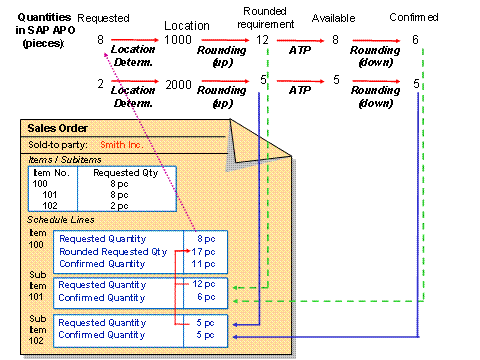
...
1. The requested quantity for the sales order item is 8 pc.
2. The system carries out location determination and determines location 1000.
It creates a subitem for location 1000.
3. For location 1000, the system rounds the 8 pc up to 12 pc.
4. Only 10 pc are available. Therefore, the availability check can only confirm 10 pc.
5. The system rounds the 10 pc down to the next package unit, which is 6 pc.
6. The requested quantity is higher than the confirmed quantity. Therefore, there is an outstanding requirement of 2 pc.
7. The system carries out location determination and determines location 2000.
It creates a subitem for location 2000.
8. For location 2000, the system rounds the remaining requirement of 2 pc up to 5 pc. Therefore, the requested quantity is 5 pc.
The requested quantities for both subitems (12 and 5) are accumulated in the rounded requested quantity schedule line of the main item.
9. As a result of the availability check, the system can confirm all 5 pc.