
 Authentication Using a Mechanism Provided by
a Partner
Authentication Using a Mechanism Provided by
a Partner 
Purpose
With this PAS option, the user is authenticated using an authentication mechanism that is provided by an SAP-certified partner. The PAS verifies the user’s authentication with the partner product. Also in this case, the authenticating mechanism can provide the user’s ID for the SAP system directly. Otherwise, the system obtains the SAP user ID from the user external ID mapping table USREXTID. The system then issues the user his or her logon ticket.
Prerequisites
For the prerequisites for using a partner mechanism for PAS, see the following topics:
· Prerequisites for Using a Partner Mechanism
· Secure Network Communications
Process Flow
See the graphic below:
Using an Authentication Mechanism Provided by a Partner
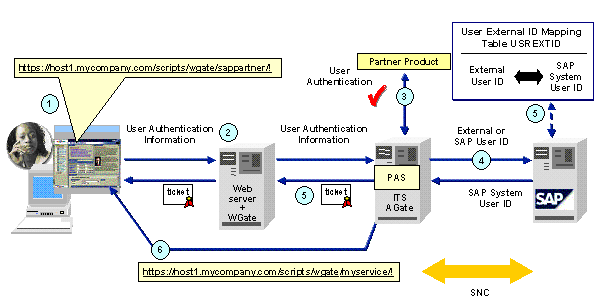
The process is as follows:
...
1. The user accesses the PAS service for using the partner’s authentication (for example, sappartner).
2. The user provides his or her user ID and password (or other authentication information) for the partner product.
3. The PAS verifies the user’s authentication information with the partner product.
4. If successful, then:
...
a. If the partner product provides the user’s ID for the SAP system directly, then the PAS passes this ID to the SAP system application server.
b. Otherwise, it passes the user’s ID for the partner product to the SAP system application server. The SAP system then searches for a matching user ID in the user external ID mapping table.
5. The PAS then creates a logon ticket for the user, which it sets in the user's Web browser.
6. The PAS redirects the user to the designated service (for example, myservice).
Result
The user accesses the SAP service after authenticating him or herself using the partner product.
When the user accesses further SAP services, the logon ticket is used for Single Sign-On access.