
 Versions within the Transport
Definition
Transport-relevant BI objects can have the following versions:
Version |
Meaning |
D(elivery) |
SAP delivery version |
A(ctive) |
Active version |
M(odified) |
Modified version |
T(ransport) |
Transport version for the import of source-system dependent objects |
Only those objects that are in the active version are exported from the development system.
Use
The following diagram illustrates how to work with active and modified versions:
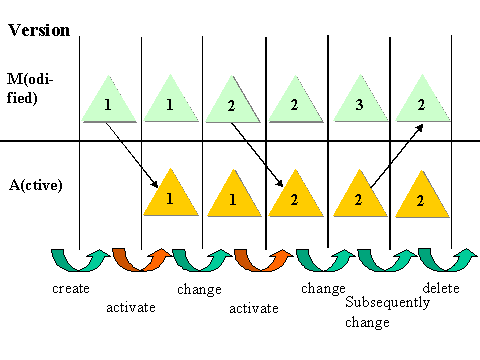
When a BW object exists in a modified version (M version) and is activated, the dependent objects (DDIC or program objects) are also generated upon activation. Activation is only possible when the object is consistent.

Make sure that the correct version is active before transporting.
Integration
The following diagram illustrates the versions within the transport:
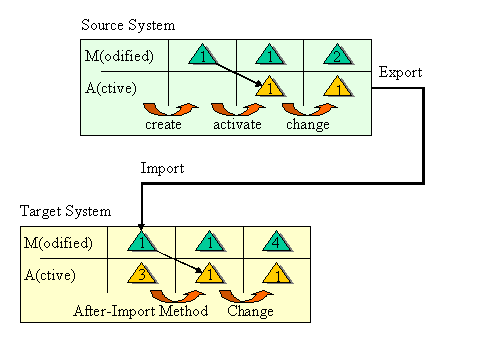
· Only those objects that are in the active version are exported from the development system.
Make sure you use customer-specific packages when transporting your objects. These begin with Y or Z.
Objects assigned to SAP packages are seen as SAP-own objects and are executed as repairs.

The Business Content A Version must be assigned to a customer package whereas the delivered D Version remains an SAP object.
· These objects are either imported into the target system in either the A version or in the M version, depending on the type. Source-system dependent objects are transported in their own version, the T (transport) version. See Transport-Relevant Metadata Object Types.
· After importing, all BI metadata objects are automatically activated using the After Import Method RS_AFTER_IMPORT. After importing, the dependent DDIC or program- objects are generated in the target system.
Examples for transport in different versions:
The currency translation type and the InfoObjectCatalog are transported into the target system in the active system. This is because these object types do not support the M version.
InfoCubes or InfoObjects are firstly imported into the target system in the M version and activated after the import automatically, since tables (and additional dictionary objects) are created during activation.
See also:
 Transport and Delivery
of Source-System Dependent Objects in the Customer Content
documentation.
Transport and Delivery
of Source-System Dependent Objects in the Customer Content
documentation.