
 Assigning a Source System to a Source System
ID
Assigning a Source System to a Source System
ID 
Use
Assigning a source system to a source system ID is necessary if, for example, you want to compound a characteristic to the InfoObject ‘Source System ID’.
When data is transferred, the source system to source system ID assignment is used to determine which value is updated for the source system ID characteristic.
The source system ID indicates the source system from which data is delivered.
Procedure
...
1. In the Administrator Workbench, choose Tools ® Assignment Source System to Source System ID from the main menu.
2. Choose Suggest Source System IDs.
1. Save your entries.

The source system ID for a source system can be changed if it is no longer being used in the master or transaction data. To do this, use the function Release IDs that are not in use in maintenance for source system ID assignment.
Exception Scenario: Data Mart
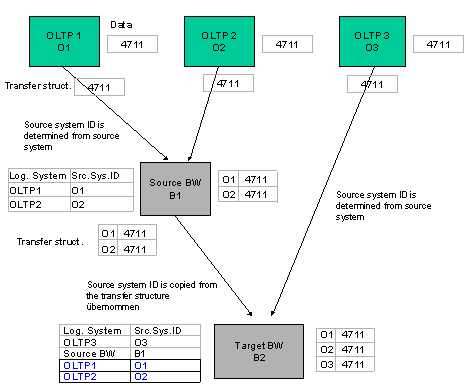
Data transfers from one BW system (source BW) into another BW system (target BW) are cases where this 1:1 assignment does not apply. The system ID for the source BW cannot be used here, since various objects that have been differentiated between in the source BW by compounding with the source system ID would otherwise collapse.
When you transfer data from the source BW to the target BW, the source system IDs are copied from the source BW. If these IDs are not yet recognized in the target BW, then you have to create them. It is possible to create source system IDs for logical systems that are not used as BW source systems.
Procedure
...
1. In the Administrator Workbench, choose Tools ® Assignment Source System to Source System ID.
2. Choose Create.
3. Enter the logical system name and a description, and confirm you entries (in this example the name would be OLTP1 or OLTP2).
4. In the Source System ID column enter the ID name that you also entered in BW1 for the corresponding source system. (In this example it would be ID 01 or ID 02).
5. Save your entries.