
 FI-CA: Electronic Bill Presentment and
Payment
FI-CA: Electronic Bill Presentment and
Payment 
Purpose
A biller can use Electronic Bill Presentment and Payment to offer bill recipients the option of paying their bills in the Internet.
Prerequisites
The biller uses the Web application SAP Biller Direct and Contract Accounts Receivable and Payable (FI-CA).
See also the introductory section of the installation and configuration guide for SAP Biller Direct (based on FI-CA).
For more information about installing, configuring, and using this process, see the software CD for SAP Biller Direct.
Process Flow
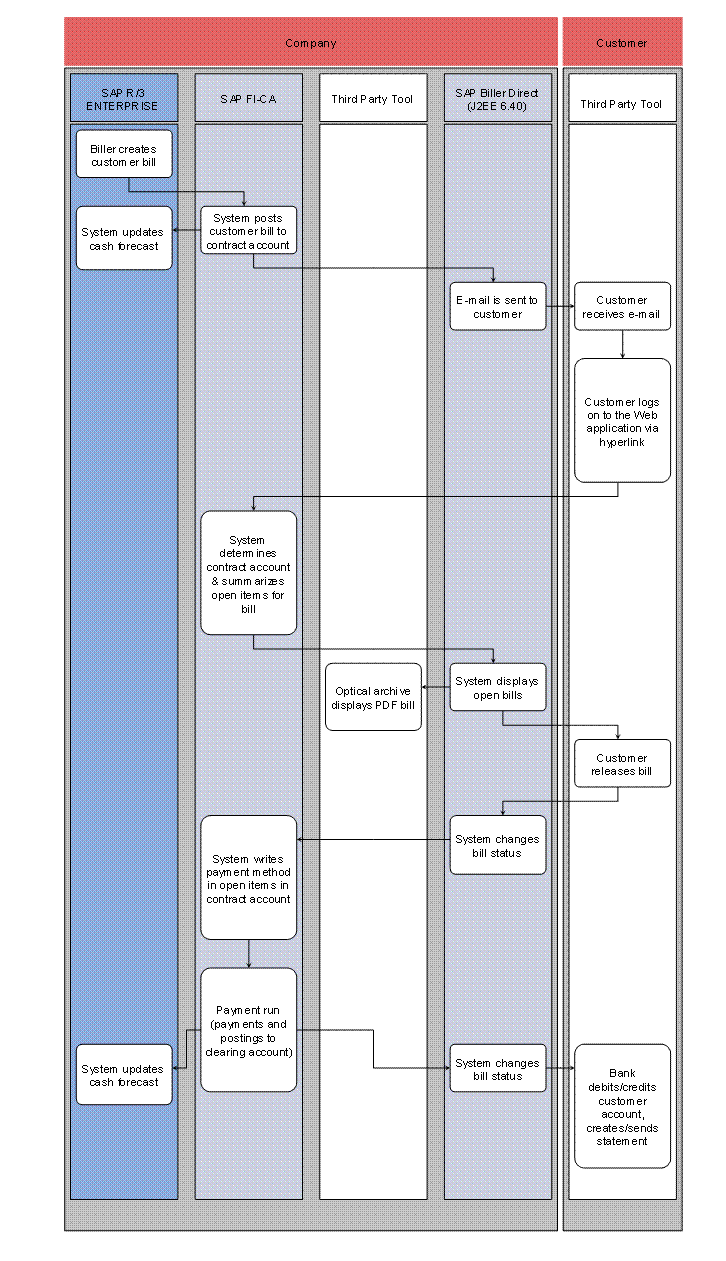
...
1. Create bill
Sales and Distribution/CRM/IS-U Billing/External Billing System
The biller creates a bill in Sales and Distribution (SD), CRM, in billing for the industry solution Utilities (IS-U), or in an external billing system.
Cash Management
Cash Management updates the liquidity forecast. For more information, see the SAP Library under Financials ® Treasury ® Cash Management.
Contract Accounts Receivable and Payable
The R/3 system posts an open item to a contract account in Contract Accounts Receivable and Payable (FI-CA).
2. Customer logs on to the Web application
The bill recipient (customer) receives an e-mail from the biller informing him that he can pay his open bills in the Internet. To access the Internet, the customer clicks on a hyperlink in the e-mail. For more information, see the Electronic Notification of Customer section in the configuration guide for SAP Biller Direct.
SAP Biller Direct
The logon screen of the Internet application appears. The Web user enters his user name and password; his open bills appear.
Contract Accounts Receivable and Payable
The R/3 system determines the business partner relating to the user, reads the open items, and summarizes them in bills.
3. Display bill
SAP Biller Direct
The R/3 system displays the open bills in the Internet application.
Optical Archive
If an optical archive is connected, the bill is displayed from the optical archive. For a detailed description of the bill display, see the configuration guide for SAP Biller Direct, in the section Displaying Bills, Credits, and Payments. For a detailed description of displaying bill details, see the Displaying Bill Details section.
4. Pay bill
SAP Biller Direct
The customer (bill recipient) pays an open bill in the Internet. The SAP R/3 system changes the status of the bill from Open to In Process. For a detailed description of paying bills, see the configuration guide for SAP Biller Direct, sections Paying Bills in Standard Mode and Paying Bills in Balance Mode.
Contract Accounts Receivable and Payable
In FI-CA, the system notes the payment method and bank details that the customer specified in the Web application of SAP Biller Direct in the item.
5. Payment
Contract Accounts Receivable and Payable
The payment run posts the payment, clears the bill concerned, and posts the payment against a bank clearing account.
Cash Management
In Cash Management the liquidity forecast is updated. For more information, see the SAP Library under Financials ® Treasury ® Cash Management.
SAP Biller Direct
The bill is given the status Processed in the Web application of SAP Biller Direct.
Biller’s Bank
The bank debits the account of the bill recipient, and credits the biller with the payment. The bank creates an account statement.