Triggering Billing
Triggering Billing
Use
The trigger for billing is specified in Customizing for the item category for CRM Business Transactions by the billing-relevance field.
Go to SAP Implementation Guide ® Customer Relationship Management ® Transactions ® Basic Settings ® Define Item Categories.
You have the following options for triggering billing:
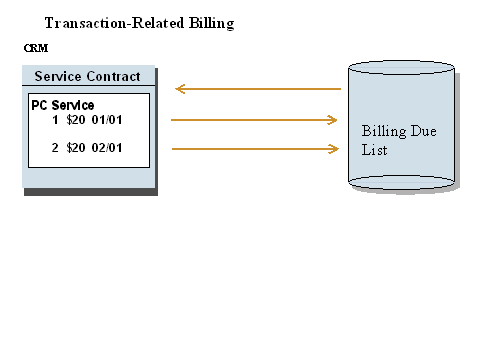
Options for Transaction-Related Billing
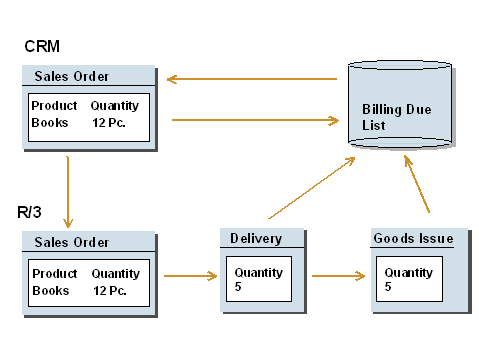
Options for Delivery-Related Billing
Transaction-related billing according to delivery quantity (billing-relevance C):
For a transaction in the CRM System, CRM Billing is called up for billing the cumulated delivery quantity. (The delivery in the R/3 back-end system returns the delivery quantity to the CRM transaction).
 Caution: In this case, you must make sure that the corresponding item category is set to "not relevant for billing" in the R/3 back-end system.

Delivery-related CRM Billing (billing-relevance F):
Following successful delivery and goods issue in the R/3 System, CRM Billing is called up in the CRM System for billing the delivery quantity.
In this case, the corresponding item category is set automatically to billing-relevance Q (billing in the CRM System) in the R/3 back-end system.
 For delivery-related CRM Billing (billing-relevance F), you must set the item category which was determined for the transaction to dependent item in Customizing for Billing. This ensures that billing is carried out dependent on the delivery (Customer Relationship Management ®
Define Item Category).
For delivery-related CRM Billing (billing-relevance F), you must set the item category which was determined for the transaction to dependent item in Customizing for Billing. This ensures that billing is carried out dependent on the delivery (Customer Relationship Management ®
Define Item Category).
For delivery-related billing, SAP recommends using billing-relevance F, as, in contrast to billing-relevance C, reference is made to individual delivery.