
 Technical Information on Indexes
Use
The Index Admin window contains technical information about all indexes for a TREX system.
Features
The window consists of the following areas:
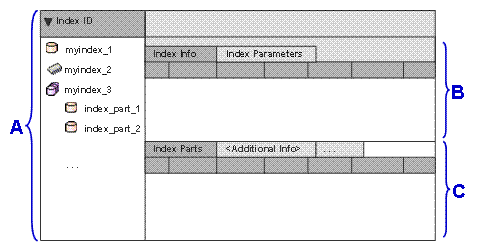
Area A: Index tree
This area displays the indexes as a tree structure. The icon in front of the index ID displays the index type:
●
 Physical
index
Physical
index
●
 Logical
index
Logical
index
●
 Compound
index
Compound
index
●
 BIA
index
BIA
index
●
 Memory
index
Memory
index
●
 Temporary index
For more information, see Index Types.
If you expand a logical index, compound index, or BIA index, you can see the index parts that it consists of:
● In the case of a logical index, you can see the associated physical indexes.
● In the case of a compound or BIA index, you can see the associated table indexes.
A table index can belong to more than one compound or BIA index. The table index exists only once, but is displayed below each superordinate compound or BIA index. The Shared column displays whether the index is shared.
By clicking the arrow in front of the Index ID, you can display the index tree as a flat list. If you click the arrow again, you return to the tree structure.
Area B: Information about physical, logical, temporary, and memory indexes
If you select one or more indexes of the types listed above in the index tree, area B displays the following information:
● Processing information
For example, you can see the time of the last indexing, the number of searchable documents, or the disk space taken up by the index.
● Index parameters
The index parameters are primarily relevant for troubleshooting.
Area C: Information about compound and BIA indexes
If you select a compound or BIA index in the index tree, area C displays technical information about these indexes. For example, it displays how the table indexes are to be linked together to obtain the required search results.